Interactive Webinar Platform: Host Live Events Instantly

Choosing the right interactive webinar platform can make or break your online events. Whether you are hosting a product launch, a corporate training session, or a live Q&A with prospects, the platform you choose determines how smoothly your audience connects with you — and how many leads you capture along the way. Pageinar’s instant broadcast landing page service is an interactive webinar platform built for speed and simplicity: sign in with Google, customize your hosted page, and you are ready to broadcast in minutes. No downloads, no plugins, no complicated setup. Just a clean, branded landing page that works seamlessly for both host and attendees from the very first session.
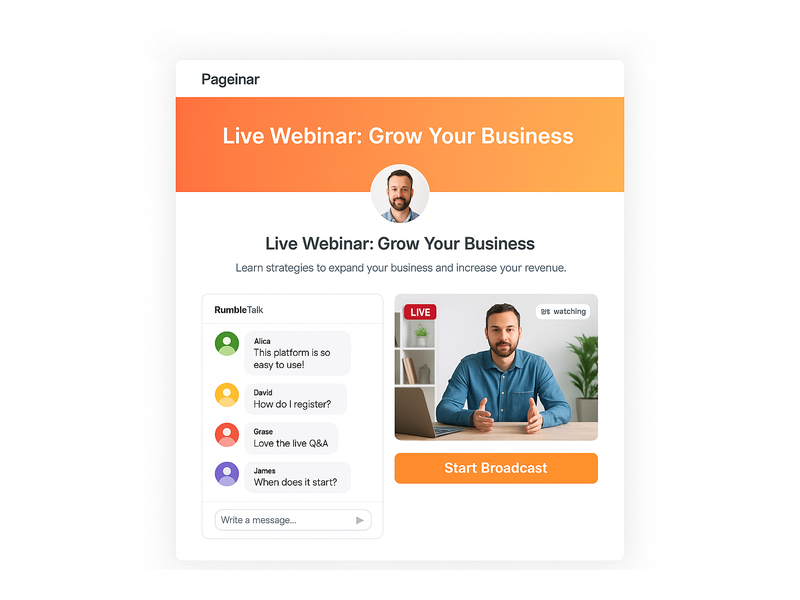
Pageinar webinar landing page illustration 1

What Makes a Great Interactive Webinar Platform?

Not every webinar tool is created equal. An interactive webinar platform should do more than simply stream video — it should engage your audience in real time, capture valuable leads, and give your brand a professional presence from the moment a visitor lands on your event page. Moreover, it should be easy enough to use that you can go live without a technical team standing by.

The key features that separate a great interactive webinar platform from an average one include:

  • Real-time audience interaction — live chat, Q&A, and moderation tools that keep viewers engaged throughout the session
  • Lead capture tools — registration forms that collect names, emails, company details, and custom fields before the event begins
  • No-friction access for attendees — viewers should be able to join without downloading any software or creating a new account
  • Branding and customization — your event page should reflect your brand, not a generic platform interface
  • Recording and replay — every broadcast should be automatically saved and exportable so you can repurpose content after the event ends

According to research on webinar adoption, interactive features like live chat and audience participation consistently rank as the top reasons attendees prefer webinars over pre-recorded videos. Additionally, platforms that remove sign-up friction for attendees see significantly higher join rates. Therefore, when evaluating an interactive webinar platform, prioritize ease of access alongside the depth of engagement features on offer.

How Pageinar Delivers as an Interactive Webinar Platform

Pageinar redefines what an interactive webinar platform looks like in practice. Instead of a complex dashboard with dozens of settings to configure before you can go live, Pageinar gives every host a single, fully branded landing page that doubles as both a registration page and a live broadcast stage. Furthermore, the entire setup takes minutes — not hours — making it ideal for busy marketing teams and solo entrepreneurs alike.

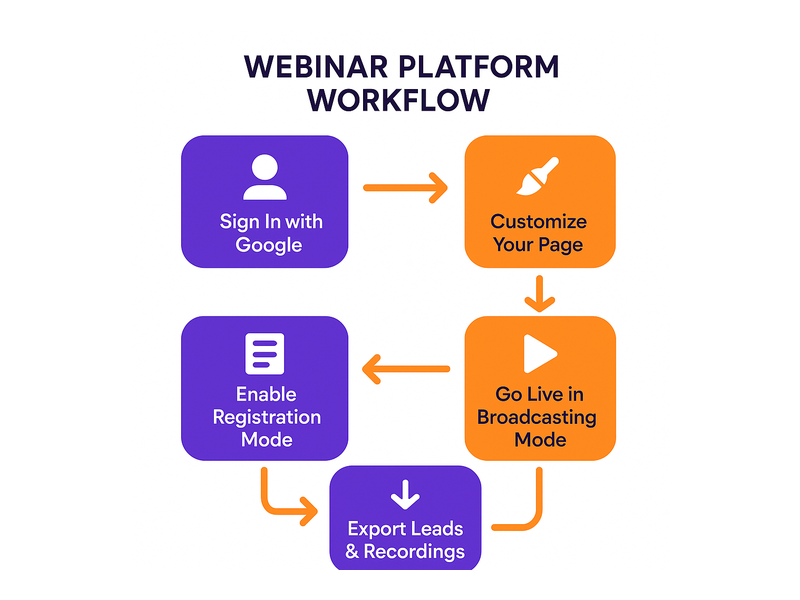
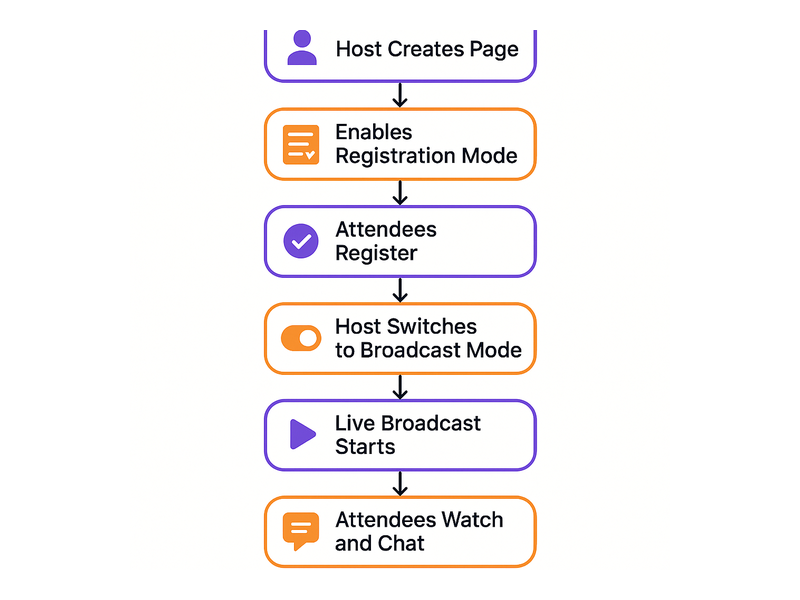
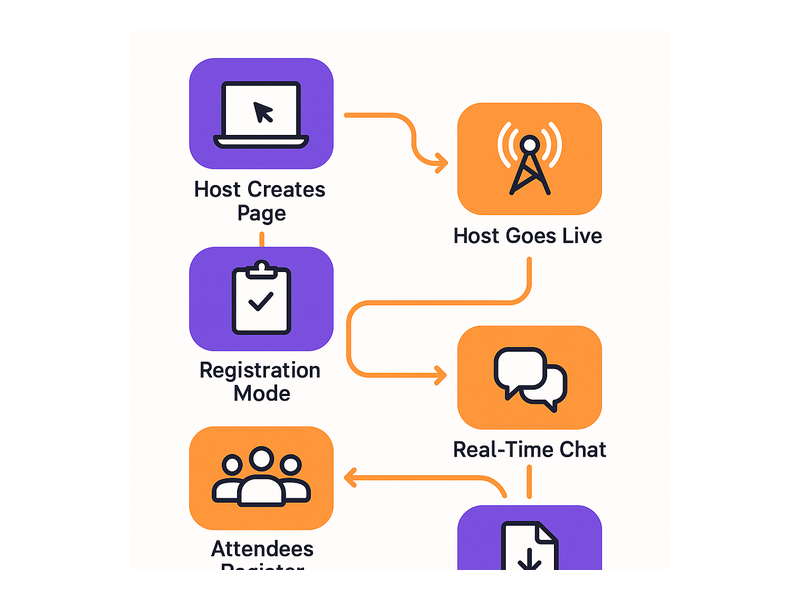
Here is how the platform works from start to finish:

  • Sign in with Google — no email and password signup; just click and you are immediately inside your account
  • Customize your page — upload a cover image or choose a background color, add your avatar, write your event title and description, and link your website
  • Toggle between modes — switch between Registration Mode to collect leads and Broadcasting Mode to go live, using a single toggle at the top right of your page
  • Share the URL — send one link to all your attendees; they open it in any browser and they are inside your event instantly, with no additional steps

Registration Mode — Collect Leads Before You Go Live

In Registration Mode, your Pageinar page transforms into a fully customizable lead capture form. You can select a registration page template, set a background color and header image or video, add a live countdown timer, and configure exactly which fields you want to collect — First Name, Last Name, Company, Phone, or any custom field you define. As a result, by the time your broadcast begins, you already have a qualified lead list waiting in your Registered List panel, searchable and exportable with one click.

This makes Pageinar an especially powerful interactive webinar platform for B2B marketers who need pipeline data, not just attendance numbers. For example, a SaaS company running a product demo can require registrants to enter their company name and job title — automatically segmenting leads for post-event follow-up without any manual data entry.

Broadcasting Mode — Go Live in One Click

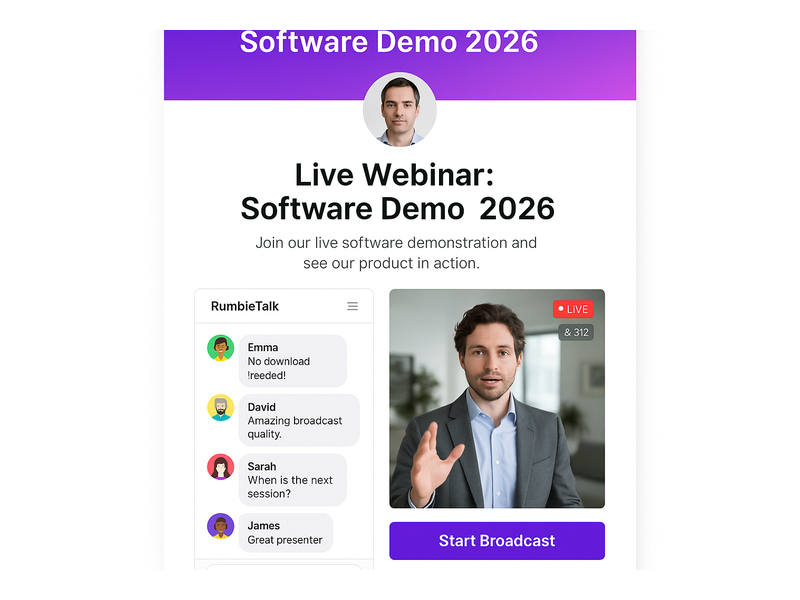
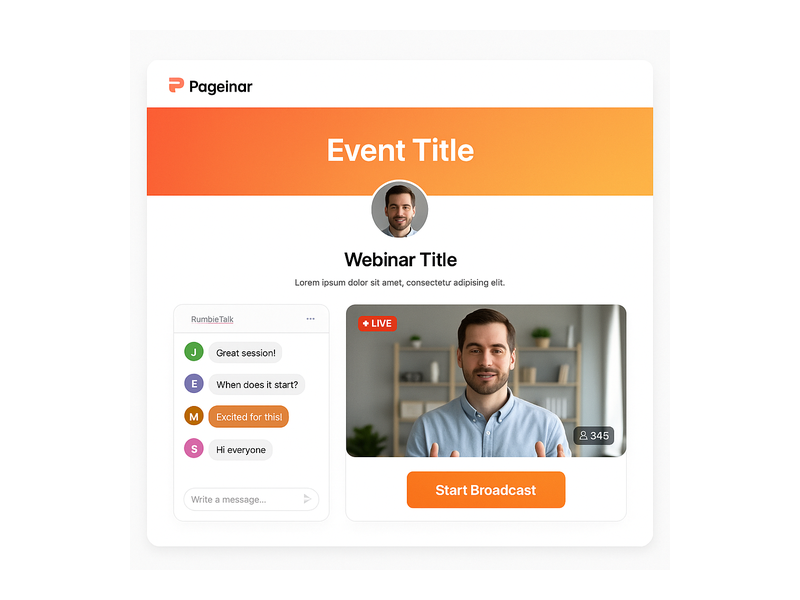
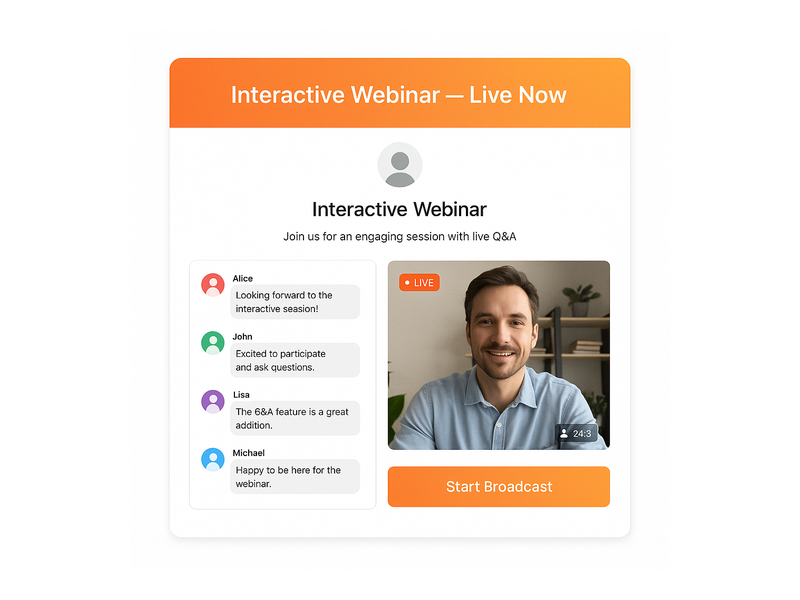
When your event begins, toggle to Broadcasting Mode and click Start Broadcast. Your page instantly displays a LIVE badge, a viewer count, and your live video feed — all inside the same hosted URL you shared with registrants. In other words, attendees never need to click a second link or install a plugin. They are already on the page and the experience is seamless.

Pageinar’s broadcasting engine is built directly into the platform, so there is no external software to install on the host side either. This frictionless experience is one of the reasons leading brands like Nasdaq, Wix, HP, and Sony Music have chosen Pageinar as their interactive webinar platform for high-stakes live events.
Pageinar webinar landing page illustration 2

The Power of Real-Time Chat on an Interactive Webinar Platform

Audience interaction is the heartbeat of any successful interactive webinar platform. Pageinar integrates a powerful group chat panel, giving hosts full moderation control, multiple visual themes, and the ability to manage who speaks and who listens — all from within the same hosted page your attendees are already viewing.

The chat panel sits alongside the live video area on every Pageinar broadcast page. Hosts can:

  • Moderate messages — approve, delete, or flag messages in real time without disrupting the broadcast
  • Set an offline message — display a custom welcome message to visitors before the broadcast starts
  • Choose chat themes — select from multiple visual themes to match your brand aesthetic and event tone
  • Control viewer and speaker display — show or hide the list of active participants depending on your preference
  • Assign chat admins — delegate moderation duties to a team member so you can focus entirely on presenting

Additionally, the chat panel displays rounded message bubbles with bold usernames and timestamps, giving your broadcast a polished, professional feel that matches the quality of the rest of your interactive webinar platform page. For instance, a corporate training webinar can use a branded chat theme with the client’s colors, making the entire experience feel like a bespoke product rather than a generic third-party tool.

Customization and Branding on Your Interactive Webinar Platform Page

First impressions matter enormously. When a registrant lands on your Pageinar page for the first time, they should immediately recognize your brand — not a generic third-party interface. Pageinar gives hosts deep customization options at every layer of the page, ensuring your event page looks as professional as the content you are delivering.

From the main page editor, you can update:

  • Cover image or background color — set a full-bleed header image or a solid brand color to anchor the page visually
  • Avatar — display your personal headshot or company logo front and center
  • Webinar title — the headline of your event, displayed prominently above the fold for every visitor
  • Description — a short, compelling summary of what attendees can expect from the session
  • Website URL — link back to your main site directly from your event page

From the Settings panel, accessed via the gear icon, you can also add social links for Facebook, Instagram, Twitter, YouTube, and Twitch — turning your broadcast page into a full social hub. Furthermore, you can password-protect your page so that only invited attendees can access the event, adding an extra layer of exclusivity for private corporate training or premium paid sessions. This level of control makes Pageinar one of the most flexible interactive webinar platforms available for teams that care about brand consistency across every attendee touchpoint.

Lead Generation and Analytics Built Into Your Interactive Webinar Platform

An interactive webinar platform that does not help you generate and track leads is leaving significant pipeline value on the table. Pageinar treats lead generation as a first-class feature, giving you the tools to capture, review, and act on attendee data without switching between multiple systems.

Every registration form submission is saved automatically in the Registered List panel inside your Pageinar settings. You can search the list by name, company, or email, and export the entire dataset for use in your CRM, email marketing platform, or sales team’s outreach workflow. The fields you collect are fully configurable — meaning you can ask exactly the right qualifying questions for your specific sales motion, whether that is company size, industry, job title, or a custom field unique to your event.

Beyond leads, Pageinar also stores all your broadcast recordings in the Broadcast Recordings panel. Each recording displays the session duration and can be exported for repurposing as on-demand content, training materials, or highlight reels shared on social media. Therefore, every live event you run on this interactive webinar platform continues to generate value long after the broadcast has ended.

For step-by-step guidance on setting up your registration and lead collection workflow, the Pageinar Knowledge Base covers everything from creating a new page to configuring custom registration fields and exporting your lead list.
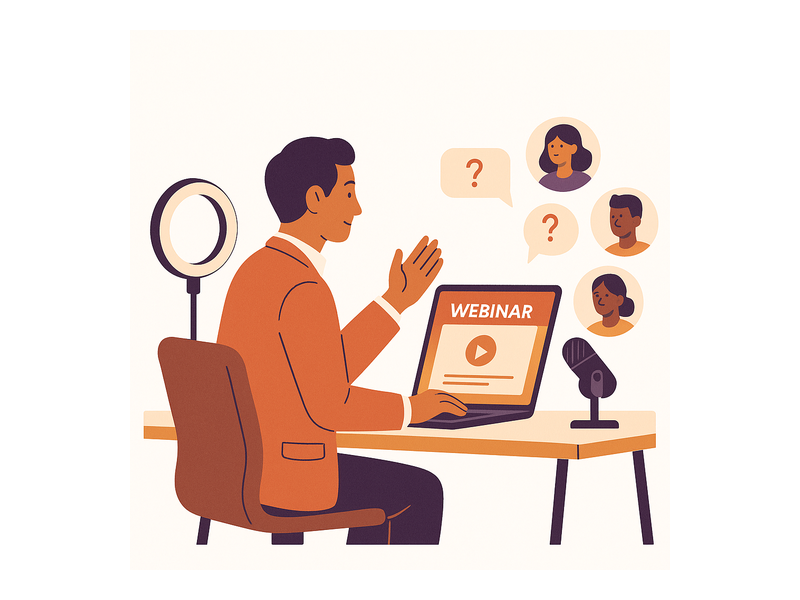
Pageinar webinar landing page illustration 3

Who Uses Pageinar as Their Interactive Webinar Platform?

Pageinar serves a wide range of use cases — from solo entrepreneurs running weekly training sessions to enterprise marketing teams hosting large-scale product launches. The common thread is a need for a professional, interactive webinar platform that works immediately without a complex IT setup or lengthy onboarding process.

Here are some of the most common use cases that organizations run on Pageinar today:

  • B2B product demos — showcase software features to qualified prospects and answer questions live via the integrated chat panel
  • Corporate training — deliver onboarding sessions or compliance training to distributed teams with full attendance tracking and exportable recordings
  • Virtual conferences — host multi-session events with a branded registration page for each session and leads exported to a central CRM
  • Marketing webinars — build pipeline by gating access behind a lead capture form and following up immediately with exported registrant data
  • Community broadcasts — engage a loyal audience with regular live sessions, using chat moderation to spark real-time discussion and keep conversations on topic

Brands like Nasdaq, Wix, HP, and Sony Music have trusted Pageinar to deliver polished, interactive broadcast experiences at scale. Their success demonstrates that an interactive webinar platform does not need to be complex to be enterprise-grade — it simply needs to be reliable, fast, and genuinely engaging for audiences of all sizes.

If you are new to running live events online, the post Unlock the Power of Seamless Webinars with Pageinar is an excellent starting point for understanding what makes Pageinar uniquely suited to modern online event hosting.

Getting Started with Your Interactive Webinar Platform Today

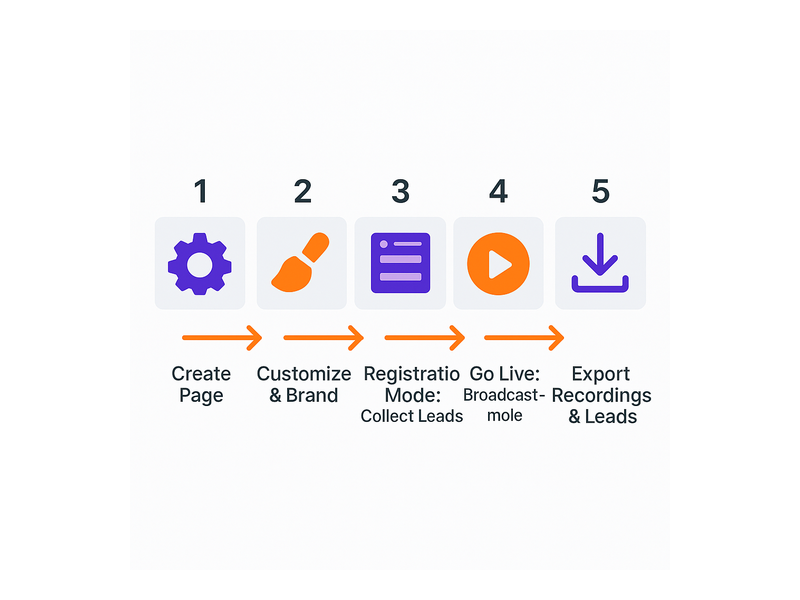
Getting up and running on Pageinar takes less than five minutes. First, visit Pageinar’s instant broadcast landing page platform and sign in with your Google account. Second, your main page is created automatically — ready for you to customize with your event title, cover image, avatar, and description. Third, configure your Registration Settings to start collecting leads, then switch to Broadcasting Mode when you are ready to go live. Finally, share your unique page URL with your audience and click Start Broadcast.

There is no installation, no plugin, and no waiting period. Your interactive webinar platform is live the moment you finish customizing your page. Attendees click your link, land on a beautifully branded event page, and engage with you in real time through the integrated chat — all without downloading a single file or creating an account. For more detailed setup instructions, the Pageinar Knowledge Base walks through every step with screenshots and examples.

Pageinar also scales gracefully with your needs. The Subscription Details panel lets you view your current plan, attendee limits, and remaining broadcast duration, with upgrade options available as your audience grows. Invoice history is stored and fully searchable by date and transaction ID, making it straightforward to manage billing for teams, agencies, and enterprise accounts alike.

Conclusion: The Interactive Webinar Platform Built for Results

In a world where audience attention is scarce and online events are everywhere, the quality of your interactive webinar platform is a genuine competitive advantage. Pageinar delivers everything you need — a branded landing page, a live broadcast engine, real-time group chat, lead capture forms, and exportable recordings — in a single hosted URL that requires zero setup on the attendee side and minimal configuration on yours.

Whether you are a marketer looking to fill your pipeline, a trainer delivering corporate education at scale, or a brand building community through regular live broadcasts, Pageinar’s interactive webinar platform gives you the professional tools to run polished events from day one. Start your first interactive webinar today and experience the difference a purpose-built, no-friction platform makes for your audience — and your results.
No Download Webinar: Host Instant Broadcasts Easily

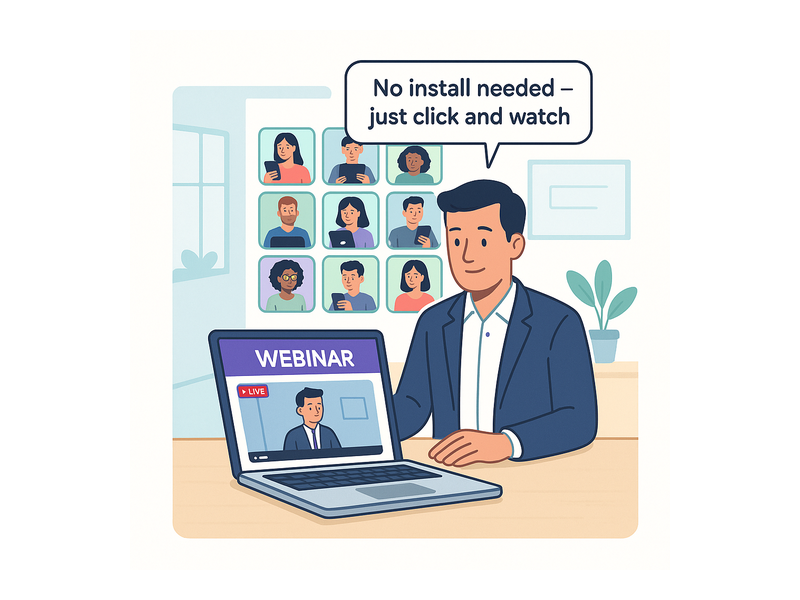
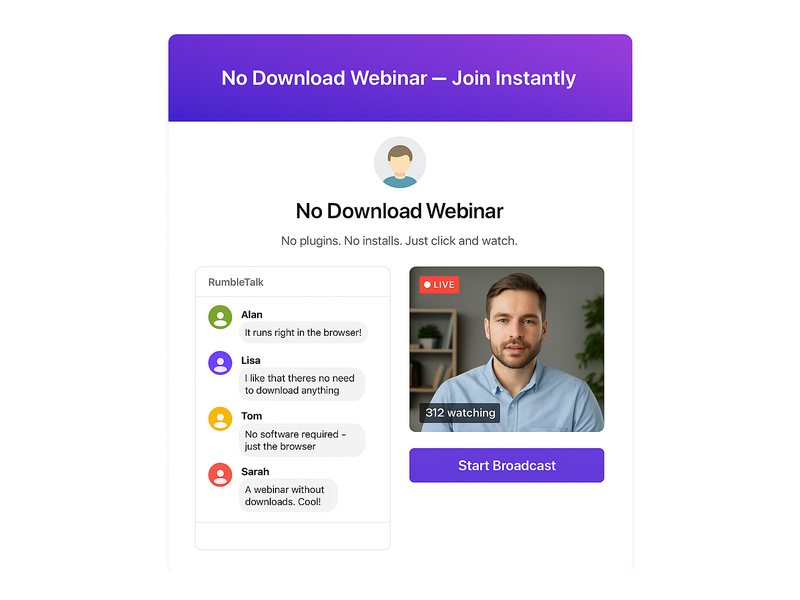
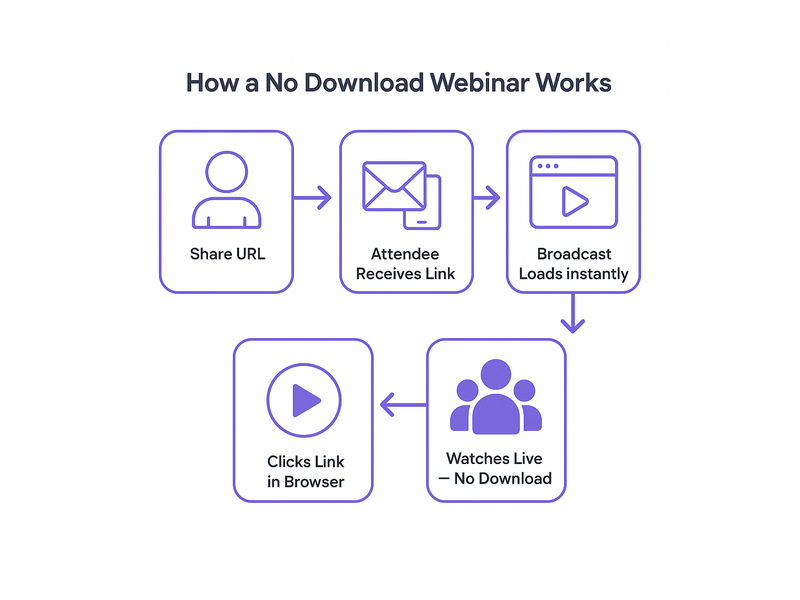
Every time an attendee is forced to install software before joining an event, the host risks losing them permanently. A no download webinar eliminates that barrier entirely — viewers click a shared URL, land on a branded broadcast page, and join the live session without installing a single plugin or application. This is not just a convenience upgrade; it is a strategic decision that directly affects attendance rates, audience reach, and overall event performance. Pageinar’s instant webinar and broadcast landing page platform was built from the ground up around this principle, delivering a fully hosted event experience that attendees access in seconds, on any device, with nothing to download.

Pageinar webinar landing page illustration 1

What Is a No Download Webinar?

A no download webinar is a live online event that runs entirely inside a web browser. Attendees do not need to install an app, a desktop client, a browser extension, or any plugin whatsoever. They receive a URL, they click it, and the broadcast begins immediately. The host manages everything — the landing page, the live video, the integrated chat, and the registrations — from a single hosted dashboard. Moreover, from the audience perspective, the experience is indistinguishable from visiting any modern website: fast, familiar, and completely frictionless. According to widely recognized webinar best practices, reducing pre-event friction is one of the most effective strategies for increasing live attendance rates.

For business audiences, the no-download model is especially critical. Corporate IT departments routinely block unauthorized software on managed devices. In fact, many enterprise employees cannot install third-party applications even if they want to. A browser-based broadcast bypasses all of those restrictions automatically. Additionally, attendees on mobile devices — smartphones and tablets — get the same seamless experience because the session runs natively in their mobile browser without any app installation required.

In short, the no download webinar is the format that removes the most common reason audiences abandon events before they even begin.

Why Download Requirements Drive Attendees Away

Before browser-native broadcast platforms became mainstream, hosts routinely saw drop-off rates of 20–40% during the pre-event setup phase. Attendees who encountered a download prompt often closed the page and never returned. Therefore, eliminating the install step is one of the highest-impact changes any event host can make to their live attendance rate. There are three primary reasons attendees leave when a software download is required:

  • Time friction: Downloading and installing software adds 5–10 minutes of unnecessary setup before the event begins. Many attendees simply do not have that buffer, especially those joining from a mobile device or a slow internet connection.
  • Security concerns: Downloading an executable from an unfamiliar source raises legitimate red flags. Attendees are increasingly cautious about running software they did not specifically seek out, and a surprise download prompt can make even a trusted host appear suspicious.
  • Device restrictions: Smartphones, tablets, Chromebooks, and corporate-managed laptops frequently prevent software installation entirely. A no download webinar works on all of these devices without any special permissions or IT approval whatsoever.

Furthermore, international audiences face additional challenges. Slow connections make large downloads painful, and installation wizards displayed in an unfamiliar language create unnecessary confusion. A browser-native event removes every one of these obstacles in a single architectural decision, ensuring that anyone with a modern browser can attend — regardless of their device, location, or technical background.

How Pageinar Delivers a True No Download Webinar

Pageinar is purpose-built for the no download webinar model. When a host signs in with Google, they immediately receive a hosted broadcast landing page — no setup wizard, no code, no third-party plugins required. The host customizes the page with a cover image or background color, an avatar, a webinar title, a description, and social media links for Facebook, Instagram, Twitter, YouTube, and Twitch. Once the page is ready, the host shares the URL with their audience. Attendees click the link, and the experience begins — entirely in the browser, with nothing to install on either side.

Registration Mode: Collect Leads Before You Go Live

Before the event, the host switches their Pageinar page to Registration Mode. In this state, visitors land on a fully branded registration form where they enter their details — first name, last name, company, email, phone number, and any custom fields the host has configured. The host can set an event date and time, display a welcome message, upload a header image or video, and enable a countdown timer to build anticipation. All collected registrations appear in the Registered List panel and can be exported as a CSV for CRM follow-up and post-event outreach campaigns.

Importantly, the no download webinar experience begins at the registration stage, not just at broadcast time. Every step of the attendee journey — registering, waiting, and attending live — happens entirely inside the browser. There is no app to install at any point, which dramatically reduces the support burden on the host’s team and keeps the audience focused on the content, not the technology.

Broadcasting Mode: Go Live With One Click

When it is time to present, the host switches to Broadcasting Mode. A single Start Broadcast button launches the live stream directly from the Pageinar page. No external streaming software, no desktop setup, no virtual camera configuration — the broadcast runs entirely through the browser. Viewers who registered, or who received the direct broadcast URL, open the page and watch live. The integrated chat panel appears alongside the video player, giving attendees a real-time group conversation with moderation tools, custom themes, admin controls, and a speaker or viewer display — all without a single download on the attendee side.

Pageinar webinar landing page illustration 2

Key Features That Power Your No Download Webinar

A successful no download webinar requires more than a simple video embed. Pageinar combines a full suite of production-ready features into a single hosted landing page, making it possible to run polished, professional events without any technical installation on either side of the broadcast:

  • Page password protection: The host can require a password to access the broadcast page, keeping private events secure without any plugin or firewall configuration needed.
  • Social media links: Built-in support for Facebook, Instagram, Twitter, YouTube, and Twitch lets attendees follow the host across platforms directly from the event page.
  • Broadcast recordings: Every session is automatically recorded. The Broadcast Recordings panel lists past sessions with full duration metadata, and recordings can be exported for on-demand distribution — extending the value of each no download webinar well beyond the live event itself.
  • Lead collection fields: The registration form supports First Name, Last Name, Company, and fully custom fields. The host toggles exactly which fields to display, keeping the form as short or as detailed as the target audience requires.
  • Chat administration: Custom chat themes, offline messages, moderation tools, and viewer or speaker toggling give the host complete control over the conversation environment during the live session.
  • Subscription management: The Subscription Details panel shows the current plan, attendee limit, remaining broadcast duration, and upgrade or cancel options — all from a single settings view.

For step-by-step guidance on any of these features, the Pageinar Knowledge Base covers everything from editing the registration page to changing chat themes, setting a page password, and exporting broadcast recordings.

Who Uses No Download Webinars?

The no download webinar format is not limited to a single industry or audience type. Organizations of every size — from independent consultants to global enterprises — choose browser-native broadcast because it removes the single biggest barrier to attendance: the installation step. Nasdaq, Wix, HP, and Sony Music have all used Pageinar to reach audiences spanning multiple devices, geographies, and IT environments without requiring a single download from any participant.

Corporate Training and Internal Communications

HR and learning and development teams rely on the no download webinar format for employee onboarding, compliance training, and company-wide all-hands broadcasts. Because corporate devices frequently block software installs, a browser-based session is often the only option that works reliably for every employee on the roster. The host sends one URL, employees click in from their managed laptops or personal phones, and the training begins immediately — no IT ticket, no install request, no delay before the first slide appears.

Marketing and Lead Generation

Marketers run product demos, thought leadership panels, and customer education sessions as browser-native broadcast events. Registration Mode captures qualified leads automatically — every registrant’s name, company, and email flows directly into the Registered List for export and CRM import. The low barrier to attendance means fewer drop-offs at the top of the funnel and more engaged, qualified prospects entering the pipeline after each event.

Virtual Events and Conference Sessions

Event organizers use Pageinar to host single-track broadcasts and multi-speaker sessions without building a custom event platform from scratch. The host customizes the landing page to match their event branding, and attendees from anywhere in the world join instantly in their browser. There is no account to create, no app to download, and no software version to verify before the session begins — just a URL and a click.

Education and Online Coaching

Educators and coaches run weekly live sessions, interactive Q&As, and workshop broadcasts using a browser-based setup. The integrated chat lets students ask questions in real time while the host moderates the conversation. The recording export feature gives absent students access to the full session replay. Additionally, for recurring programs, the host keeps the same Pageinar URL across every session — attendees simply bookmark it and return each week with zero setup overhead on their end.

Pageinar webinar landing page illustration 3

No Download Webinar Setup: Step-by-Step on Pageinar

Setting up a no download webinar on Pageinar takes fewer than ten minutes from first sign-in to going live. Here is the complete process, start to finish:

  1. Sign in with Google — visit Pageinar and use the Google sign-in button. No email or password account is required — authentication runs entirely through Google OAuth, so there is nothing extra to create.
  2. Customize your broadcast landing page — upload a cover image or select a background color, add your avatar, and fill in the webinar title, event description, and your website URL.
  3. Configure Registration Mode — open the Settings panel, select Registration Settings, choose a registration page template, write a welcome message, set the event date and time, and toggle the lead collection fields you want to capture from registrants.
  4. Share the registration URL — copy your Pageinar page URL and distribute it via email campaigns, social posts, or any marketing channel you use. Attendees register instantly in the browser with no download step at any point.
  5. Switch to Broadcasting Mode — when the event is about to begin, toggle your page to Broadcasting Mode using the top-right control on your Pageinar dashboard.
  6. Hit Start Broadcast — click the button and you are live. Registered attendees see the stream load in real time — still in their browser, still with nothing to install or configure.
  7. Manage chat and moderate — use the chat admin panel to pin important messages, manage participants, or spotlight guest speakers during the live session.
  8. Export leads and recording — after the event ends, download the Registered List as a CSV and export the broadcast recording for on-demand access, follow-up campaigns, or content repurposing.

Each of these steps is fully documented in the platform’s help resources, giving every host — regardless of technical background — the confidence to run a polished, professional event independently.

Browser-Based Broadcasts vs. Traditional Desktop Platforms

Traditional webinar tools often require attendees to install a desktop client, grant permissions through a proprietary launcher, or create a platform-specific account before they can view the event. The result is a multi-step onboarding process that begins before a single slide is shown — and each extra step costs the host a measurable portion of their expected audience.

A no download webinar on Pageinar compresses the entire attendee journey into a single URL click. The broadcast loads in the browser. The chat opens alongside the video. The host controls everything from one dashboard. There is no launcher to install, no version check to run, no confusing audio permission dialog, and no IT approval required for participants on managed corporate devices.

Additionally, because Pageinar pages are permanent hosted landing pages — not one-time meeting rooms that expire after a session — the host can reuse the same URL for every recurring event. Regular attendees bookmark the page and return each week with zero new setup. This consistency is particularly valuable for ongoing training series, weekly marketing webinars, and subscription-based content programs where audience retention across sessions matters.

For a comprehensive introduction to everything the platform offers, read Unlock the Power of Seamless Webinars with Pageinar — a full overview of the broadcast capabilities and the design philosophy behind the product.

Conclusion: Make Every Event a No Download Webinar

The no download webinar is no longer an emerging format — it is the new baseline expectation for modern online events. As audiences grow less willing to install software and more likely to join from mobile devices, tablets, or IT-managed corporate laptops, browser-native broadcast platforms have shifted from a convenience option to a competitive necessity. Pageinar delivers a complete, production-ready no download webinar solution: a fully customizable branded landing page, built-in lead collection, one-click broadcasting, integrated moderated chat, automatic session recording, and exportable attendee data — all accessible through a URL, on any device, in any browser, with absolutely nothing to install.

If you are ready to eliminate installation friction and maximize attendance at your next event, sign up at Pageinar today and launch your broadcast landing page in minutes — a truly frictionless no download webinar experience for you and every member of your audience.

Browser Webinar Platform: Go Live With Zero Installs

A browser webinar platform changes how modern businesses host, manage, and scale live online events. Moreover, it eliminates the frustration of software downloads, plugin conflicts, and compatibility issues that traditional desktop tools impose on every attendee. Pageinar is a purpose-built hosted webinar and broadcast landing page service that lets any host go live in minutes — sign in with Google, customize your landing page, and share a single URL. First, you invite your audience. Then, attendees click the link and join the browser webinar platform instantly, with no app to install and no account required on their side. In fact, global brands like Nasdaq, Wix, HP, and Sony Music already rely on this seamless approach for professional live events. Therefore, if you want to reach more people with less friction, a browser-based webinar solution is the clear path forward.

Pageinar webinar landing page illustration 1

What Makes a Browser Webinar Platform Different From Desktop Tools

Today, the standard for live events is shifting rapidly. Furthermore, audiences expect to click a link and join immediately — not navigate through installers, update screens, or permission dialogs. A browser webinar platform delivers exactly that: a fully hosted, cloud-based environment where the webinar lives at a URL. As a result, hosts gain instant reach, and attendees gain instant access from any device. In other words, the URL is the product itself.

Traditional desktop-based tools require attendees to download software, create accounts, and grant system-level permissions before a single slide appears. Alternatively, a browser webinar platform requires none of that overhead. Moreover, it runs on any modern device — laptop, tablet, or smartphone — without extra configuration or IT support. Ideally, this is what every online event should feel like: frictionless, professional, and fast.

For hosts, the advantages are equally compelling. First, there is no server to manage or maintain independently. Second, updates and new features deploy automatically through the cloud infrastructure. Third, the hosted landing page handles everything from pre-event registration to live broadcasting in a single unified place. Together, these benefits make a browser webinar platform the most practical choice for businesses that value time, simplicity, and consistent professional presentation.

Pageinar as a Browser Webinar Platform: Core Features

Pageinar packages every essential live-event feature into a single hosted landing page. Moreover, you do not need to manage multiple tools or build integrations between your webinar software, email platform, and CRM. Here is what Pageinar’s browser webinar platform includes out of the box:

Registration Mode and Lead Collection

Before your event goes live, Registration Mode turns your Pageinar page into a branded lead-capture form. Additionally, you can collect First Name, Last Name, Company, and fully custom fields — each field is individually toggleable from the settings panel. Furthermore, you can set a date, time, welcome message, and header image or video to prime your audience before the event. As a result, your attendees register directly on the page you control, and every lead is stored automatically and exportable at any time. This pre-event capability makes Pageinar a complete marketing tool, not just a broadcasting service.

Broadcasting Mode and Live Video

When you are ready to go live, simply toggle to Broadcasting Mode from your main page. In fact, the broadcast starts directly from your Pageinar page — no external streaming encoder, no RTMP configuration, and no third-party software required. Moreover, a red LIVE badge and a live viewer count badge appear automatically for all attendees the moment you begin. Therefore, your audience always has real-time confirmation that the event is active. The browser webinar platform manages all the technical complexity behind the scenes so you can focus entirely on your content and audience engagement.

Integrated Chat With Full Moderation

Every Pageinar broadcast page includes a built-in group chat panel. Furthermore, the chat supports full moderation tools, multiple visual themes, admin role assignment, and a configurable viewer and speaker display. Additionally, you can set a custom offline message between events, assign a dedicated chat admin, and adjust audience permissions at the session level. As a result, the chat experience feels polished and on-brand for every live event. For any browser webinar platform, real-time audience interaction is a non-negotiable requirement — and Pageinar delivers it without any third-party chat integrations.

Password Protection and Social Sharing

Sometimes webinars are private, gated for clients, or reserved for paying customers. Therefore, Pageinar lets you password-protect your broadcast page directly from the settings panel with a single toggle. Moreover, you can add social links — Facebook, Instagram, Twitter, YouTube, and Twitch — to maximize pre-event sharing and organic reach. Together, these controls give you complete ownership over who attends and how your event is promoted across every channel where your audience lives.

Pageinar webinar landing page illustration 2

How to Launch Your First Event on a Browser Webinar Platform

Getting started with a browser webinar platform should be simple and immediate. In fact, Pageinar makes the entire process faster than almost any alternative available today. Here is the complete step-by-step workflow for your first broadcast:

  • Sign in with Google at pageinar.com — no email or password signup required, no form to complete.
  • Your main page appears immediately — a fully editable broadcast landing page ready for customization.
  • Upload a cover image or select a background color, upload an avatar, and add your webinar title, description, and website URL.
  • Toggle to Registration Mode to collect attendee leads before the event begins.
  • Share your unique page URL with your audience via email, social media, or direct messaging channels.
  • When you are ready to present, toggle to Broadcasting Mode and click Start Broadcast to go live instantly.
  • Attendees open the link in their browser and join the broadcast immediately — no downloads, no plugins, no account creation required.

Additionally, you can review the Pageinar Knowledge Base for detailed guides on every setup step. Moreover, the Knowledge Base covers topics such as password protection, lead collection field configuration, chat theme customization, and broadcast recording exports in full detail.

For teams that are new to browser-based live event hosting, we also strongly recommend reading Unlock the Power of Seamless Webinars with Pageinar — a comprehensive introduction to the platform’s core capabilities and how to extract maximum value from your first live broadcast.

Use Cases for a Browser Webinar Platform Across Industries

A browser webinar platform is not a one-size-fits-all product. Moreover, it adapts naturally to a wide range of professional contexts, team sizes, and audience types. Here are the most impactful use cases across modern industries:

Product Launches and Announcements

Companies use Pageinar to announce new products directly to prospects and existing customers in a live, interactive format. Furthermore, Registration Mode collects qualified attendee details before the event begins, giving marketing teams a clean lead list from every product launch. As a result, the sales pipeline grows organically with every broadcast event the team runs.

Corporate Training and Employee Onboarding

HR and learning-and-development teams broadcast training sessions directly from the browser webinar platform without scheduling complex conference calls or managing video software licenses. Additionally, completed sessions are stored automatically in the Broadcast Recordings panel and are fully exportable for later reuse. Therefore, teams can simultaneously run live training and build a growing library of on-demand content for future employees and contractors.

Thought Leadership Webinars and Expert Panels

Consultants, agencies, and industry analysts use Pageinar to host public-facing webinar series that build their brand authority over time. Moreover, the branded landing page reinforces their professional image and creates audience confidence before the event even begins. The integrated chat panel encourages active participation from viewers, making each session more engaging, memorable, and shareable.

Sales Demonstrations and Client Presentations

Sales teams share a Pageinar URL instead of scheduling screen-share meetings that require clients to download software or create accounts. Furthermore, the platform’s clean branded layout creates a polished first impression that reflects well on the selling organization. In addition, post-event lead exports integrate directly into CRM workflows for immediate and structured follow-up with every attendee.

Community Events and Nonprofit Broadcasts

Even smaller organizations benefit enormously from a well-designed browser webinar platform. In fact, zero technical setup means volunteers and community managers can run professional live events without any IT support or dedicated technical staff. Additionally, flexible pricing makes Pageinar accessible for nonprofits, community groups, and educators who need professional tools at a practical budget level.

Pageinar webinar landing page illustration 3

Managing Your Broadcasts With Pageinar’s Settings Panel

Beyond the live broadcast itself, Pageinar gives hosts deep and granular control through a comprehensive settings panel. Moreover, every section is designed for non-technical users who need real power without a steep learning curve. Here is a complete overview of what you can manage from settings:

  • Broadcast Settings — toggle page password protection on or off and add social platform links to maximize pre-event sharing reach.
  • Registration Settings — choose a registration page template, set a background color, configure lead capture fields, add a header image or video, and display a countdown timer for added urgency.
  • Registered List — view, search, and export all collected attendee leads including Name, Company, Email, Phone, and registration date in a clean exportable format.
  • Broadcast Recordings — review all past recordings with full duration data and export individual recordings for repurposing as on-demand content or archival.
  • Chat Settings — select chat type, assign admin roles to trusted moderators, pick from multiple visual chat themes, and configure the offline message displayed between live events.
  • Subscription Details — review your current plan, check attendee limits and remaining broadcast duration, and upgrade or cancel your subscription in a single click.
  • Account — manage your account email address or delete your broadcast page if needed.

Together, these settings make Pageinar a fully self-contained browser webinar platform management dashboard. Furthermore, there is no need to log into separate tools for lead management, recording exports, billing history, or chat administration — everything is in one place.

Why Leading Brands Trust a Browser Webinar Platform for Live Events

Nasdaq, Wix, HP, and Sony Music have all used Pageinar to deliver professional live broadcasts to global audiences. Moreover, they chose a browser-based approach specifically to reduce the attendee drop-off that technical barriers consistently create. In fact, research shows that when attendees must download software before joining an event, a meaningful percentage abandons the process before ever entering the session. Alternatively, a browser webinar platform removes that barrier entirely and keeps audiences engaged from click to broadcast end.

Furthermore, the fully hosted landing page gives brand and marketing teams complete creative control over design, messaging, and audience experience. In other words, the event becomes a natural and seamless extension of the company’s broader web presence. Ideally, every attendee’s first impression should feel polished, professional, and fully on-brand — and a well-built browser webinar platform makes that standard easy to achieve consistently at any event scale.

Security, Reliability, and Scalability Built In

Password protection, Google-only authentication for hosts, and PayPal-based billing create a secure and trusted environment for both hosts and registered attendees. Moreover, the cloud-hosted infrastructure means the platform scales automatically to meet audience demand without any action required from the event host. Therefore, whether you broadcast to ten attendees or ten thousand, the browser webinar platform delivers consistent and reliable performance on every occasion. According to the Web conferencing overview on Wikipedia, browser-based delivery is increasingly the industry standard for accessibility and cross-device compatibility — and Pageinar is built precisely on that foundation.

Get Started With a Browser Webinar Platform Today

If you have not yet experienced hosting on a true browser webinar platform, today is the ideal moment to start. Moreover, Pageinar’s free plan gives you immediate access to core broadcasting and registration features — no credit card required and no technical setup needed. In fact, you can move from account creation to your first live broadcast in under five minutes from now.

First, visit Pageinar’s instant webinar and broadcast landing page platform and sign in securely with your existing Google account. Then, customize your page with your branding, configure your registration form to capture the leads you need, and share your unique page URL with your target audience. Finally, click Start Broadcast when your audience is assembled — and let the browser webinar platform handle every technical detail from that moment forward. Your next successful live event is one URL away.

Webinar Platform: The Complete Guide to Live Broadcasting with Pageinar

Finding the right webinar platform is one of the most important decisions a B2B team can make. Whether you run product demos, virtual training, or high-profile broadcasts, your choice matters. Your webinar platform shapes how professional your event looks and how many leads you capture. Pageinar is an instant webinar and broadcast landing page service. It removes every technical barrier between host and audience — no plugins, no downloads required.

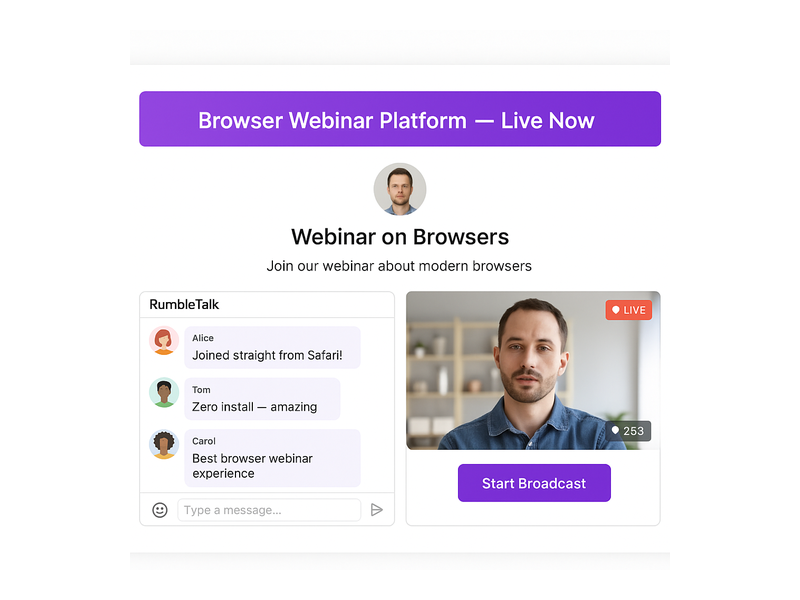
Pageinar webinar platform showing live broadcast area and RumbleTalk chat panel

What to Look for in a Webinar Platform

Not all webinar solutions deliver the same results. However, the best webinar platform options share a core set of qualities. These include zero-friction attendee access, reliable live streaming, built-in engagement tools, and seamless lead capture. Moreover, enterprise marketing teams need their hosting solution to double as a lead generation engine — not just a video tool.

For example, your sales team may run weekly product demos. In that case, you need a webinar platform that captures attendee details before the session. Additionally, it should store recordings automatically and export leads to your CRM. The platform should also require no software installation from your audience. They should be able to join with a single link and no friction at all.

In fact, according to industry research on web conferencing, regular live events drive higher lead conversion. Organizations that broadcast consistently outperform those relying only on static content. Furthermore, a well-branded broadcast page builds trust before a single word is spoken.

How the Pageinar Webinar Platform Works

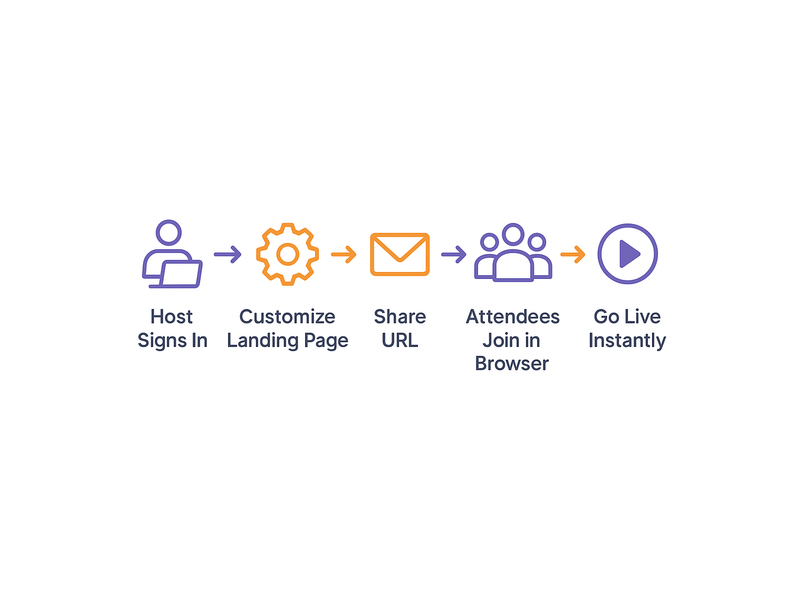
Pageinar takes a fundamentally streamlined approach to live broadcasting. First, the host signs in with their Google account — no email or password setup required. Second, they land directly on their hosted broadcast landing page. It is ready to customize and share immediately. Third, viewers open the event URL in any browser and join without downloading plugins or apps. In other words, the entire experience runs on a single hosted page.

The host’s page is fully editable. You can set a cover image, upload an avatar, write your webinar title and description, and add your website URL. Therefore, every Pageinar page feels like a branded event destination — not a generic video room. This customization is one reason Nasdaq, Wix, HP, and Sony Music chose this webinar platform for their live events.

Registration Mode — Collect Leads Before the Event

Before going live, hosts toggle the page to Registration Mode. In this mode, visitors see a registration form rather than the broadcast interface. As a result, you capture attendee information before the event begins. Fields include first name, last name, company, phone, and any custom fields you configure.

Additionally, registration settings let you set a date and add a welcome message. You can also upload a header image or video and display a countdown timer. Better still, all collected leads are stored in the Registered List. You can search, filter, and export them at any time. This transforms your webinar platform into a complete lead generation funnel.

For example, a B2B consulting firm can gate their monthly strategy webinar behind a registration form. The form can ask for company size and current challenge. Consequently, the sales team enters follow-up calls with richer context per contact. To set this up step by step, visit the Pageinar Knowledge Base. It covers lead collection configuration and every other platform feature in detail.

Broadcasting Mode — Go Live Instantly

Once ready to broadcast, toggling to Broadcasting Mode reveals the Start Broadcast button directly on the page. Pressing it initiates the live stream from the Pageinar interface. No external software is required. Furthermore, a red LIVE badge and a live viewer count display in real time. This gives the event a professional atmosphere that viewers immediately recognize.

The integrated RumbleTalk chat panel runs alongside the broadcast throughout the session. Specifically, attendees can ask questions, share reactions, and discuss content — all on the same hosted page. The host has full admin controls. They can moderate messages, mute users, select a chat theme, and configure an offline message. In short, the chat experience is as polished as the broadcast itself.

Webinar platform setup workflow diagram from registration to live broadcast

Key Features That Set This Webinar Platform Apart

Pageinar combines broadcasting, audience engagement, and lead capture into a single hosted page. Therefore, teams do not need separate tools for streaming, chat, registration, and recording. Here is a closer look at what makes this webinar platform stand out for B2B teams.

Broadcast Recordings — On Demand After Every Event

Every broadcast is automatically recorded and stored in the Broadcast Recordings panel. Session duration and export options are included. Consequently, you can share replays with registrants who could not attend live. You can also repurpose recordings as gated content or archive sessions for internal training. For teams running recurring webinars, this archive becomes a growing content asset. It continues to generate value long after each live event ends.

Flexible Lead Collection and Registration Templates

The registration settings panel offers multiple template options for the page layout. Moreover, every form field is configurable — toggle first name, last name, company, and phone. You can also add unlimited custom fields tailored to your qualification process. For example, a SaaS company might add a field for ‘Team Size’ to pre-qualify attendees. As a result, post-event sales outreach becomes more targeted and effective. That is a key advantage of a well-designed webinar platform.

Password Protection and Social Promotion

Pageinar includes built-in page password protection. This makes it easy to run members-only events, internal training sessions, or partner-only broadcasts. In addition, the Broadcast Settings panel lets you add social profile links directly to your event page. You can connect Facebook, Instagram, Twitter, YouTube, and Twitch. This ensures attendees can follow your brand without leaving the experience — a meaningful touchpoint for audience building.

Chat Themes and Moderation Controls

The chat settings panel gives hosts complete control over the engagement experience. Specifically, you can choose from multiple visual chat themes to match your brand identity. Configure an offline message and toggle the visibility of viewer and speaker lists. Ideally, this control makes even large-scale events feel intimate and well-managed. It keeps audiences engaged and reduces disruptive interactions during the broadcast.

Who Uses a Webinar Platform Like Pageinar?

Pageinar’s client base spans some of the world’s most recognized brands. However, the platform is equally effective for smaller teams. Here are the most common use cases for a modern webinar platform:

  • B2B Product Demos: Sales teams run live product walkthroughs and capture leads through the registration form before the session begins.
  • Online Training and Onboarding: HR and L&D teams broadcast internal training sessions, with recordings stored on demand for new hires and remote employees.
  • Thought Leadership Broadcasts: Marketing teams host industry panels and expert interviews on a branded page that reinforces company positioning.
  • Virtual Product Launches: Product teams coordinate launch-day events with a registration page that builds anticipation and collects a qualified lead list before the broadcast.
  • Partner and Reseller Enablement: Channel teams run enablement webinars for partner networks, using password protection to restrict access to invited participants only.
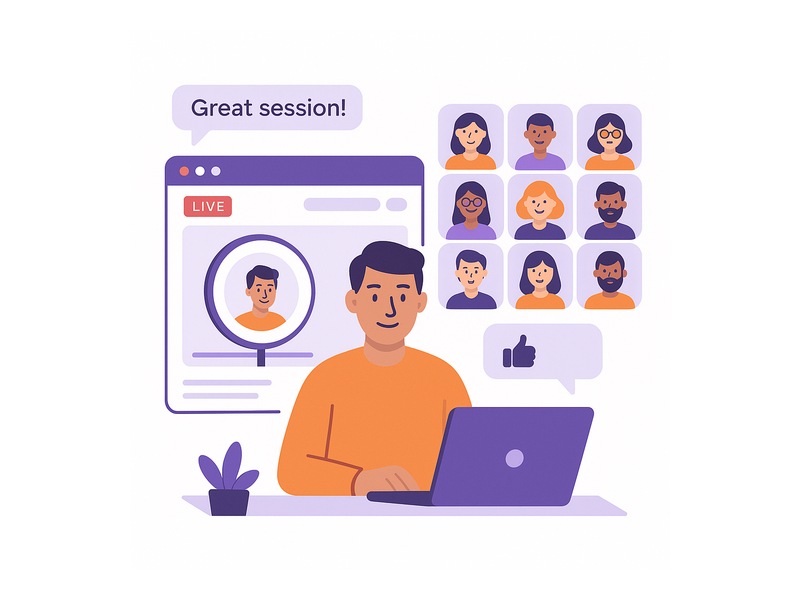
Team hosting a live event using the Pageinar webinar platform on a laptop

Getting Started with Your Webinar Platform

Getting started with Pageinar as your webinar platform requires no technical setup at all. First, visit pageinar.com and sign in with your Google account. Second, your hosted broadcast landing page is immediately available and fully editable. Third, customize your event title, upload a cover image, and configure your registration form. Share the URL — your event is ready. The entire setup typically takes under ten minutes for a first-time user.

In addition, the Pageinar Knowledge Base provides step-by-step guides for every feature. These cover lead collection fields, chat themes, and exporting broadcast recordings. For further inspiration, read Unlock the Power of Seamless Webinars with Pageinar. See how teams are transforming their online engagement with this webinar platform.

Why the Right Webinar Platform Changes Everything

In today’s competitive B2B landscape, attention is the scarcest resource. Therefore, every friction point in your event experience is a potential drop-off point. A plugin download prompt, a confusing registration flow, or a lagging chat all cost you attendees. Alternatively, a webinar platform that removes these barriers by design keeps your audience focused on the content and your brand.

Furthermore, when your webinar platform functions as a branded landing page, it reinforces your company identity at every touchpoint. Together, the broadcast and registration page create a cohesive funnel. This funnel runs from first click to qualified lead to post-event follow-up. In other words, the right platform does not just stream video — it generates pipeline.

In short, the best webinar platform is not the one with the longest feature list. It is the one your team will actually use, consistently and confidently. Pageinar is built to grow your audience and close more deals. It is simple enough to launch in minutes and powerful enough for enterprise broadcasts.

Ready to Launch Your Next Event on a Modern Webinar Platform?

If you are ready to elevate your live events and capture more qualified leads, Pageinar is the webinar platform designed for the way modern teams work. Sign in with Google, customize your page, and go live in minutes. No code, no plugins, no complexity for your attendees. Visit pageinar.com and launch your first broadcast today. Your audience is just one URL away.

Live Webinar Software: Host Broadcasts With Zero Setup

Choosing the right live webinar software can transform how your business connects with its audience. Whether you are running a product demo, a training session, or a company-wide announcement, the platform you choose determines every aspect of the attendee experience. Pageinar — the all-in-one webinar and broadcast landing page platform — takes a refreshingly simple approach: attendees open a URL and the event begins. No downloads, no plugins, no installation required. In this guide, we cover everything you need to know about modern live webinar software and how Pageinar delivers a broadcast experience that works effortlessly for hosts and attendees alike.

Pageinar webinar landing page illustration 1

What Is Live Webinar Software and Why Does It Matter?

Live webinar software is a platform that enables hosts to broadcast video, audio, and interactive content to a remote audience in real time. However, not all solutions are built the same. Traditional webinar tools often require attendees to install desktop applications or browser extensions before they can join a session. As a result, many potential attendees drop off before the broadcast even begins, costing hosts valuable leads and engagement.

Modern live webinar software solves this problem by running entirely in the browser. Attendees simply click a link. Moreover, hosts can manage registration, broadcasting, chat moderation, and lead collection all from a single dashboard. For global organizations like Nasdaq, Wix, HP, and Sony Music, this level of reliability and simplicity is non-negotiable. Additionally, the best live webinar platforms offer deep customization — a branded event page builds trust and professionalism from the very first second an attendee arrives. For broader context on how online events have evolved, the web conferencing overview on Wikipedia provides useful background on the history and trajectory of live online broadcasts.

Core Features Every Live Webinar Solution Must Have

First, a reliable broadcast engine is non-negotiable. A solid live webinar tool must deliver low-latency video with minimal buffering. Second, interactive features — live chat, Q&A, and moderation controls — keep the audience engaged throughout the session. Third, lead collection tools let you capture attendee information before the broadcast begins. Finally, exportable recordings help you measure your event’s impact and repurpose content long after the session ends.

  • Instant browser-based access — no downloads required for attendees
  • Customizable registration pages and broadcast landing pages
  • Integrated live chat with moderation and admin controls
  • Password-protected pages for private or exclusive events
  • Lead collection with custom form fields
  • Exportable recordings and attendee lists
  • Social media integration for cross-platform promotion

How Pageinar Reinvents Live Webinar Software

Pageinar takes a fundamentally different approach to live webinar software. Instead of forcing hosts to connect multiple disconnected tools — a broadcast platform here, a registration form there, a chat widget somewhere else — Pageinar combines everything into one hosted landing page. Additionally, setup takes minutes rather than days. Users sign in with their Google account, customize their page, and share the URL with their audience. There is no software to install on the host side either.

In other words, Pageinar is live webinar software designed entirely around the host’s workflow. The result is a professional broadcast experience that works out of the box. Moreover, because everything runs on a hosted page managed by Pageinar, there is no server to maintain, no software to update, and no version conflicts to troubleshoot. Hosts can focus entirely on their content rather than their infrastructure.

Registration Mode vs. Broadcasting Mode

One of Pageinar’s most powerful features is the two-mode toggle built into every broadcast page. Furthermore, switching between modes takes a single click — making it seamless to move from pre-event lead collection into a live broadcast when the time comes.

Registration Mode transforms the page into a branded lead capture form. Hosts can customize the registration template, set a background color, write a welcome message, configure a date and time countdown, and choose exactly which fields to collect — First Name, Last Name, Company, Phone, and any custom fields relevant to their audience. Importantly, every registered attendee is stored in the Registered List, where hosts can search, view, and export their leads at any time before or after the event.

Broadcasting Mode activates the full live experience. The broadcast page displays the host’s avatar, event title, cover image, and description alongside the live video player and integrated chat panel. Viewers see the OFFLINE or LIVE status badge updated in real time. When the host clicks Start Broadcast, the red LIVE indicator appears for all attendees simultaneously — no delay, no coordination required.

Pageinar webinar landing page illustration 2

Setting Up Your Live Webinar Page Step by Step

Getting started with Pageinar as your live webinar software is genuinely straightforward. First, visit pageinar.com and sign in with your Google account. After login, you land immediately on your main broadcast page — a fully editable hosted landing page that serves as your complete webinar hub. Second, customize the page with your branding: upload a cover image or set a background color, add your avatar, write the event title, link your website, and craft a compelling description that draws attendees in.

Additionally, the Settings panel — accessed from the gear icon — gives hosts fine-grained control over every element of the event. Under Broadcast Settings, you can password-protect your page to limit access to invited attendees. You can also connect your social media profiles — Facebook, Instagram, Twitter, YouTube, and Twitch — directly on the broadcast page, turning every event into a cross-platform promotion opportunity that extends your reach well beyond the webinar itself.

Collecting Leads Before Your Broadcast

Under Registration Settings, you control the entire lead collection experience. Specifically, you configure the registration page template, background color, welcome message, event date and time, header image or video, countdown timer visibility, and the precise fields each attendee must complete before gaining access. As a result, you arrive at every broadcast with a curated list of qualified, engaged prospects already captured and ready for follow-up.

After the event, exporting the Registered List takes a single click. Therefore, your sales team receives a fresh batch of warm leads with zero manual data entry. For detailed configuration steps, the Pageinar Knowledge Base covers everything from creating your first page to managing advanced broadcast and registration settings.

Integrated Live Chat Powered by RumbleTalk

Live chat is central to what makes live webinar software valuable. Pageinar’s integrated chat panel is powered by RumbleTalk — a professional group chat engine with full moderation tools, customizable visual themes, admin controls, and viewer and speaker display options. Hosts can set an offline message that appears in the chat panel before the broadcast starts. Furthermore, the admin panel lets hosts mute disruptive attendees, remove problematic users, and highlight important messages — all in real time during the live session without interrupting the broadcast flow.

Lead Generation With Live Webinar Software

One of the strongest reasons to invest in live webinar software for B2B marketing is the quality of leads it produces. Webinars consistently generate high-intent prospects because attendees self-select — they raise their hand to attend your event. Therefore, every person who registers is already a qualified lead who has expressed genuine interest in your topic, your company, or your offer. Cold outreach cannot match that level of intent.

Pageinar makes this lead generation process entirely friction-free. The registration page collects the exact fields you need — names, companies, email addresses, phone numbers, and any custom data points relevant to your sales process. After the event, you export the full Registered List with a single click. In short, your pipeline fills up with warm, interested prospects without any cold outreach budget required.

Moreover, many B2B marketers now use live webinar software as their primary top-of-funnel channel. Instead of spending budget on display ads targeting cold audiences, they invite their target market to a valuable educational event and let interested prospects come to them. Additionally, every broadcast recording becomes a long-tail content asset. For example, you can offer it as a gated download, post clips on LinkedIn, or embed the full recording on a resource page — multiplying the return on a single broadcast many times over.

Pageinar webinar landing page illustration 3

Recordings, Analytics, and Long-Term Post-Event Value

The best live webinar software does not stop delivering value when the broadcast ends. Pageinar automatically saves every broadcast as a recording. Under the Broadcast Recordings panel in your settings, you can view all past sessions with full duration details and export recordings for distribution or repurposing at any time. There is no time limit on access and no complex export process — it is always available.

Additionally, a single one-hour webinar can generate weeks of content across multiple channels. For example, you can embed the recording on a dedicated resource landing page, share short clips on LinkedIn or Instagram, or offer the full session as a premium gated download for new subscribers. Therefore, your investment in each live event compounds long after the broadcast window closes, delivering ongoing value to your content marketing strategy.

Who Uses Live Webinar Software Like Pageinar?

Live webinar software is not reserved for large enterprise teams. However, it scales effortlessly to meet enterprise-level demands. Pageinar has powered live broadcasts for global organizations including Nasdaq, Wix, HP, and Sony Music, as well as independent consultants and small businesses running intimate solo sessions for niche audiences.

Common use cases across industries include:

  • Product demos — show prospects exactly how your solution works in a live, interactive format with real-time Q&A
  • Training and onboarding — educate employees or customers at scale with no travel costs or scheduling conflicts
  • Thought leadership events — position your brand as an industry authority through panel discussions, expert interviews, and fireside chats
  • Lead generation campaigns — capture high-intent prospects through a fully branded, gated webinar registration flow
  • Company announcements — broadcast product launches, quarterly updates, or executive town halls to a global distributed audience
  • Community events — host regular meetups, AMAs, or skill-building workshops directly under your brand

For more insight into how live broadcast technology can power your business strategy, read Unlock the Power of Seamless Webinars with Pageinar — a detailed look at the platform’s full capabilities and the real-world business results it delivers for teams of every size.

Ready to Launch Your First Live Webinar?

If you have been searching for live webinar software that combines professional broadcast capabilities with absolute zero friction for attendees, Pageinar is the answer. Sign in with your Google account, customize your broadcast page in minutes, and share the URL. No downloads, no plugins, no complicated technical setup — just a clean, branded event page that works on any device and in any modern browser, anywhere in the world.

Whether you are hosting your very first webinar or scaling an enterprise broadcast program for thousands of attendees, Pageinar gives you every tool you need in a single hosted page. Additionally, the free plan lets you explore the full platform before committing to a paid subscription — so there is genuinely no risk in getting started today. Visit Pageinar — your complete live webinar and broadcast platform and launch your first event right now.

Webinar Landing Page: How to Build, Launch, and Convert with Pageinar

A webinar landing page is the single URL your audience uses to register, watch, and engage with your live webinar event. In fact, it is your digital front door. However, most tools force you to stitch together a registration form, a streaming service, and a chat app. That fragmentation costs you leads. Moreover, it creates technical headaches and a broken attendee experience. Pageinar’s all-in-one broadcast platform removes all of that complexity. You sign in with Google and get a fully hosted, customizable page instantly. No plugins. No code. No setup delays.

Pageinar webinar landing page showing live broadcast area and integrated chat

What Makes a Great Webinar Landing Page?

Not every webinar landing page delivers results. In fact, most event pages fail because they miss one or more of three core components. First, you need a compelling registration experience. Second, you need a smooth live broadcast environment. Third, you need a real-time audience engagement layer. Together, these three elements turn a simple URL into a high-converting event page.

A Branded Registration Experience

Before your event goes live, your page works as a registration hub. It needs to reflect your brand and make signing up easy. With Pageinar, you switch to Registration Mode with one click. That instantly activates a customizable template. For example, you can upload a header image or video. You can choose a background color and write a personalized welcome message. Additionally, you can display the event date and time and toggle a live countdown timer. That timer builds urgency as your broadcast approaches.

For B2B teams, the lead collection layer delivers real value. You can enable fields for First Name, Last Name, Company, and phone number. Moreover, you can add custom fields for your specific campaign. For instance, ask attendees about their industry or team size. Every registration flows automatically into the Registered List. As a result, your sales team gets clean lead data with no manual data entry required.

A Seamless Live Broadcast Environment

When your event begins, your broadcast page transforms into a live stage. Pageinar’s Broadcasting Mode places a large video player front and center. A Start Broadcast button appears for the host only. Attendees open the same URL they used to register. Therefore, the live stream starts immediately in their browser. No external software. No encoder setup. No RTMP keys. In short, the broadcast runs directly from your Pageinar page.

That frictionless flow from registration to live event is a major advantage. For example, a host can go from zero to live in under a minute. Attendees never navigate away. They never download anything. As a result, attendance rates stay high from start to finish.

Integrated Live Chat for Real-Time Engagement

Engagement is what separates a live webinar from a recorded video. Pageinar’s broadcast page includes a built-in RumbleTalk group chat panel. It comes with full moderation controls, multiple themes, and admin mode. Hosts can moderate questions in real time. Moreover, they can pin important messages and keep the conversation on topic. Best of all, the chat runs directly on your webinar landing page. Your attendees never leave the page to chat. As a result, engagement stays high throughout the event.

For high-profile broadcasts — events for Nasdaq, Wix, HP, and Sony Music — a professional moderated chat is a core requirement. Additionally, the questions attendees ask during a live session reveal real buying signals. That means your sales team gets valuable intelligence for follow-up outreach.

Webinar landing page setup workflow — from registration to live broadcast

How to Set Up Your Webinar Landing Page with Pageinar

Getting your webinar landing page live takes just a few minutes. Here is exactly how it works, step by step.

Step 1: Sign In with Google

Pageinar uses Google Sign-In exclusively. You authenticate once and land directly on your broadcast page. Better still, it is already live and hosted on Pageinar’s infrastructure. Therefore, no domain setup or installation is required. In other words, you start customizing immediately.

Step 2: Customize Your Page Identity

Your event page is fully editable from the main interface. Upload a cover image or choose a background color. Add your avatar and set the event title. Enter your website URL and write a compelling event description. For step-by-step guidance on every option, visit the Pageinar Knowledge Base. In fact, it covers every customization available.

Step 3: Configure Registration and Lead Collection

Open the Settings panel and go to Registration Settings. Choose your registration template and set the event date and time. Moreover, select which lead collection fields to enable. For B2B webinars, enable the Company field and at least one custom qualification field. Additionally, if your event needs access control, you can password-protect your webinar landing page from the Broadcast Settings panel.

Step 4: Set Up Your Chat Experience

In Chat Settings, select a RumbleTalk theme that matches your brand. For example, multiple visual themes are available — from minimal and professional to bold and expressive. Next, designate chat admins who will manage the conversation during your broadcast. Furthermore, set an offline welcome message for early arrivals. A well-configured chat sets a professional tone from the very first message.

Step 5: Go Live and Record Everything

Toggle your page from Registration Mode to Broadcasting Mode using the switch in the top-right corner. Click Start Broadcast. Your audience watches the live stream directly in their browser. No download needed. After the event, your Broadcast Recordings section saves every session automatically. Therefore, those recordings become on-demand content and lead generation assets you can use for months.

Step 6: Share Your Social Links

Pageinar lets you add social profile links to your event page. Connect Facebook, Instagram, Twitter, YouTube, and Twitch. In addition, these links give attendees clear paths to follow your brand after the broadcast. As a result, your event page becomes a multi-channel touchpoint — not just a one-time URL.

Webinar Landing Page Best Practices for B2B Teams

Having the right platform is only part of the equation. These best practices help B2B teams get maximum value from every webinar landing page they publish.

Lead With the Audience Outcome

Your event title is the most persuasive copy on your page. Lead with the specific result attendees will walk away with. For example, “How to Reduce Customer Churn by 30% This Quarter” converts far better than “Customer Success Webinar.” Specificity signals expertise. Moreover, it filters out unqualified registrants before they reach the form.

Keep Registration Fields Minimal

Every additional field reduces your conversion rate. Collect only what your sales team actually uses. Typically that means First Name, Last Name, Business Email, and Company. Add custom fields sparingly. However, when you do add them, make sure the data genuinely improves lead scoring. Pageinar’s field controls let you enable or disable any field without touching code.

Activate the Countdown Timer

Pageinar’s registration mode includes a built-in countdown timer. Visitors who see “14 hours remaining” register immediately instead of saving the tab and forgetting. Therefore, enable the countdown timer for every time-bound event. It is one of the simplest conversion improvements you can make at no extra cost.

Brief Your Chat Admins Before the Broadcast

Designate at least one chat admin before your event begins. Ideally, they should know the agenda and be ready to moderate from the first message. Set an offline welcome message that greets early arrivals. Furthermore, an actively moderated chat signals professionalism to every attendee. It keeps your audience focused on the content you worked hard to prepare.

Build a Post-Event Content Lifecycle

Your Broadcast Recordings section captures every session automatically. Do not let those assets sit idle. For example, export your recordings and embed them on your website as on-demand content. Alternatively, publish them behind a registration gate to keep generating leads. As a result, a well-executed broadcast page delivers value for months after the original event date.

Team hosting a live event using a webinar landing page on Pageinar

Who Uses Pageinar for Their Webinar Landing Pages?

Pageinar is used across industries where live communication matters. Financial services firms host investor briefings and compliance training. SaaS companies run product demos and partner enablement events. Media companies use it for live Q&A discussions and editorial panels. Furthermore, educational institutions host certification workshops and alumni engagement programs.

The common thread is clear. They all need a professional webinar landing page that is ready instantly — without requiring IT resources or technical setup. Trusted by Nasdaq, Wix, HP, and Sony Music, Pageinar handles both small internal meetings and large-scale public broadcasts. In addition, if you are new to the platform, start with Unlock the Power of Seamless Webinars with Pageinar for a full introduction.

Start Building Your Webinar Landing Page Today

Your webinar landing page is the foundation of every live event you run. It is where leads are collected before the broadcast. It is where your video streams in real time. Moreover, it is where your audience engages through live chat. Getting that foundation right determines the outcome of everything that follows.

Pageinar gives you everything in a single hosted URL. No fragmented toolchain. No setup delays. No technical support tickets. Therefore, sign in at Pageinar’s instant webinar broadcast platform and have your first professional broadcast page live within minutes. Your next high-impact event starts right here.