Crafting the Perfect All-In Webinar Landing Page

In the dynamic world of online marketing and engagement, webinars have emerged as powerful tools for businesses and professionals alike. However, hosting a stellar webinar alone is not enough. To ensure your event reaches its full potential, you need a meticulously crafted webinar landing page.

A landing page is a single web page that serves a specific purpose within a broader online marketing or advertising campaign. It’s designed to prompt visitors to take a particular action, such as signing up for a newsletter, downloading an e-book, registering for a webinar, or making a purchase.

Landing pages are typically stripped of distracting elements and navigation menus to focus the visitor’s attention on the primary call-to-action. They are an essential tool in digital marketing for driving conversions and capturing leads, as their simplicity and focus make it easier to guide visitors toward the desired goal.

In this comprehensive guide, we will look into the intricacies of creating the ultimate webinar landing page, combining insights from industry statistics and practical strategies to maximize conversion rates.

Importance of a Well-Designed Webinar Landing Page
webinar landing page

In the realm of digital engagement, where first impressions hold significant importance, the significance of a meticulously crafted webinar landing page cannot be overstated. It’s the virtual doorstep to your webinar, the place where potential attendees make their crucial decision to enter. This section looks into why a well-designed landing page is the backbone for success, offering insights supported by industry statistics.

  1. First Impressions Matter: The saying “you never get a second chance to make a first impression” holds true for webinars. A well-designed landing page is equivalent to a virtual handshake, making a memorable first impression that entices potential attendees and significantly boosts conversion rates by up to 23%.
  2. Reflects Webinar Quality: Just as a fine wine deserves an elegant glass, your high-quality webinar deserves an equally impressive landing page. A poorly designed page can inadvertently convey doubts about the webinar’s quality, potentially dissuading potential attendees. In fact, 38% of users will stop engaging with a website if the content or layout is unattractive.
  3. Builds Credibility: Trust is the currency of the digital realm. Accordingly, a landing page meticulously designed with professionalism and clarity builds credibility, establishing your authority in the subject matter and nurturing trust with potential attendees.
  4. Increases Engagement: A visually appealing and user-friendly landing page is the gateway to increased engagement. Users spend an average of 5.94 seconds looking at a website’s main image, so captivating visuals are crucial. Therefore, its design and structure should be enticing enough to keep visitors exploring, ultimately leading them to register.

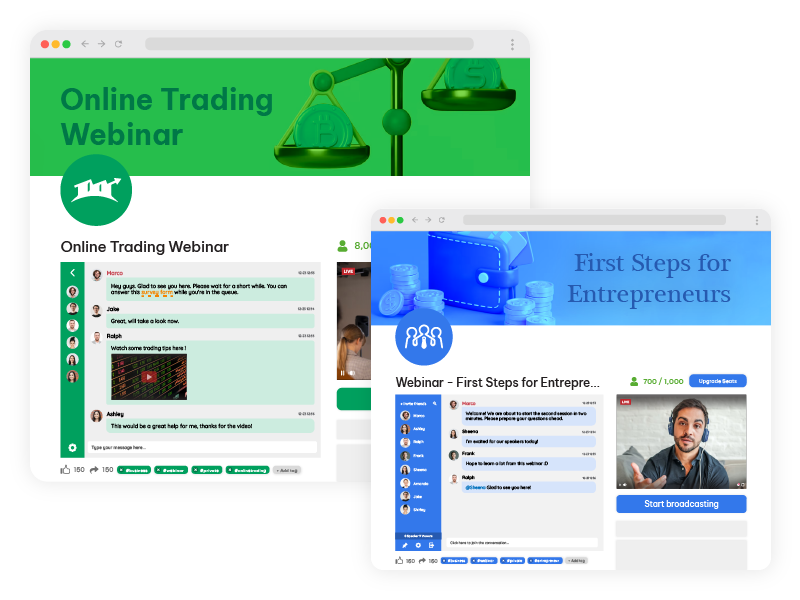
Pageinar: Your All-in Webinar Landing Page

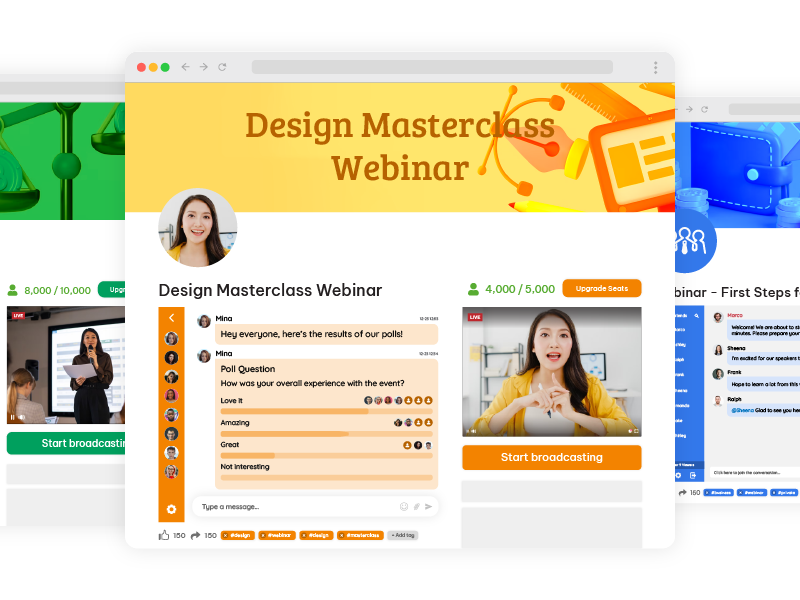
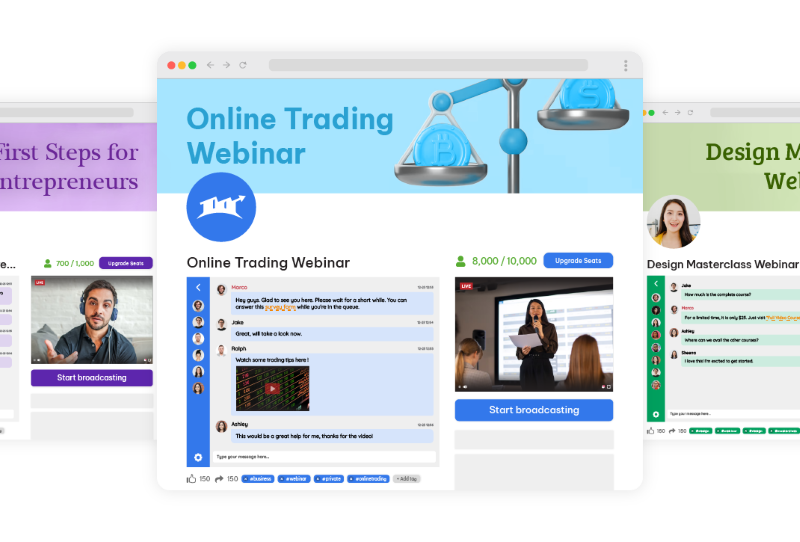
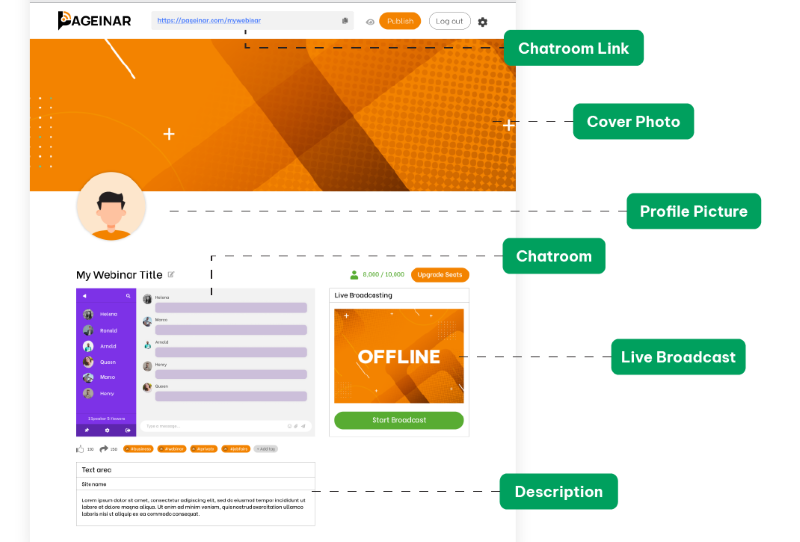
Pageinar is a versatile landing page platform that empowers you to effortlessly tailor your content, seamlessly integrate broadcasting, and incorporate chat rooms, all while maintaining a user-friendly and straightforward interface for your audience.

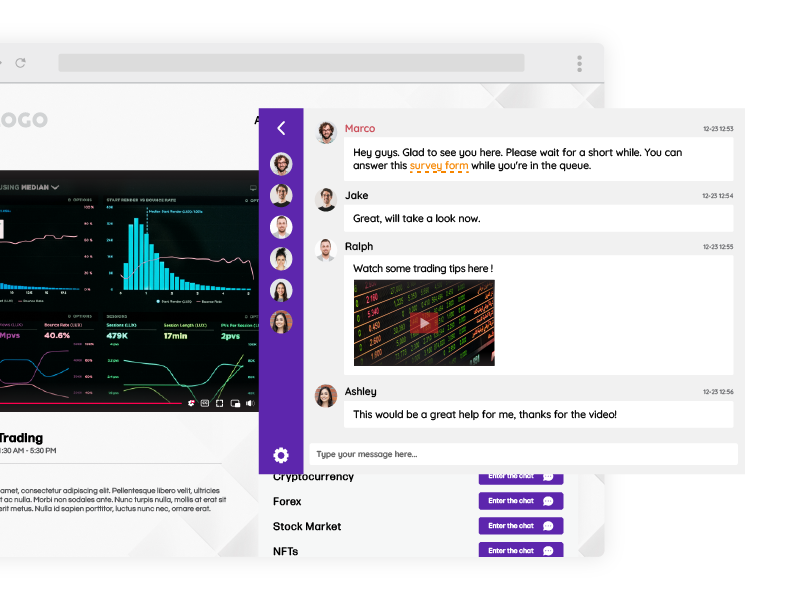
Through the platform, you can create a one-to-many broadcast and use it for webinars or live streaming. The chat room serves as a bridge for two-way communication between the streamer and the audience. In addition, there are moderation and customization tools that can assist in enhancing user experience.

As a new and upcoming platform for webinars, Pageinar serves to give their users the all-in webinar landing page. There’s no need to start from scratch. Pageinar is already pre-made with a theme, which you can adjust according to your preferences. Once you’re satisfied with your copy and how your elements look, then you can start broadcasting your webinar.

Key Elements of an Effective Webinar Landing Page

Every great webinar landing page is a combination of key elements carefully calibrated to capture attention, drive engagement, and spur registrations. To navigate this landscape successfully, it’s essential to understand the fundamental building blocks that constitute an effective landing page. Here, we will also explore these crucial elements and their pivotal roles in the conversion process, backed by data-driven insights and how you can achieve this with Pageinar.
  • Attention-Grabbing Headline: Your headline should be a beacon, guiding visitors toward registration. Moreover, a clear and concise headline that conveys the webinar’s value succinctly can be the difference between a quick exit and a registration. In Pageinar, you can create a webinar title that will capture your audience’s interest with one look.
  • Compelling Copy: Your copywriting skills will be put to the test here. According to research, companies with 30+ landing pages generate 7 times more leads than those with fewer than 10. Persuasive, benefit-driven copy that crisply communicates the advantages of attending the webinar is paramount in convincing potential attendees to commit their time. Through the Site Description box, you can add text that will highlight the importance of your webinar, the current topic, and other information that is needed to understand your webinar.
  • Eye-Catching Visuals: As humans, we are naturally drawn to visuals. Through high-quality images and videos, you can transform your landing page, making it more visually enticing and fostering greater engagement. With Pageinar, you can choose themes that will make your webinar enticing. As the landing page is also straightforward, your audience will not be confused with all the elements on your page. It’s simple and beginner-friendly for anyone who wants to create a webinar with a landing page.
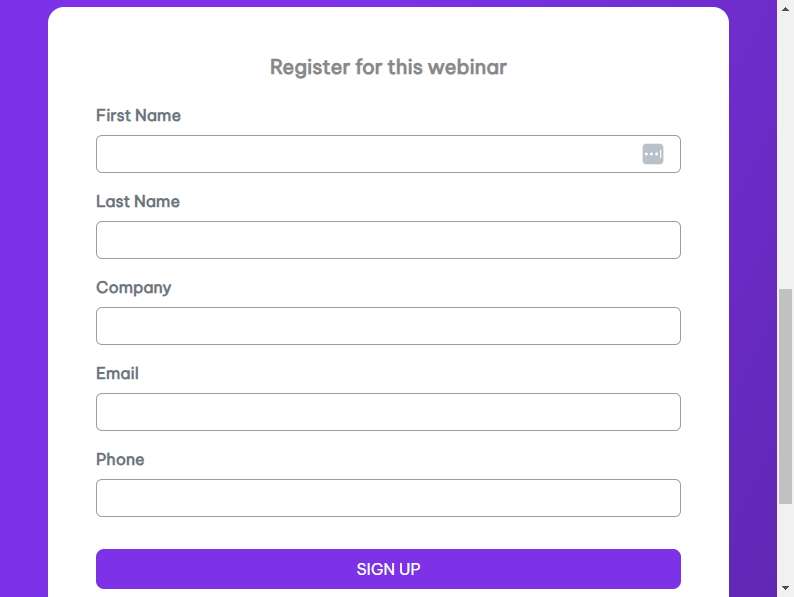
  • Registration Form: Simplicity is key when it comes to registration forms. The shorter and more user-friendly the form, the higher the likelihood of potential attendees taking the plunge and registering. In fact, reducing the number of form fields from 11 to 4 can increase conversions by 120%.

Pageinar has a simple registration form. There are many ways to register such as:

  • Social media
  • New user registration

For these, email and password are needed. That’s all there is to it. So, there’s no need to input contact numbers, addresses, etc, unlike other registration forms.

Design and Layout Considerations for your All-In Webinar Landing Page

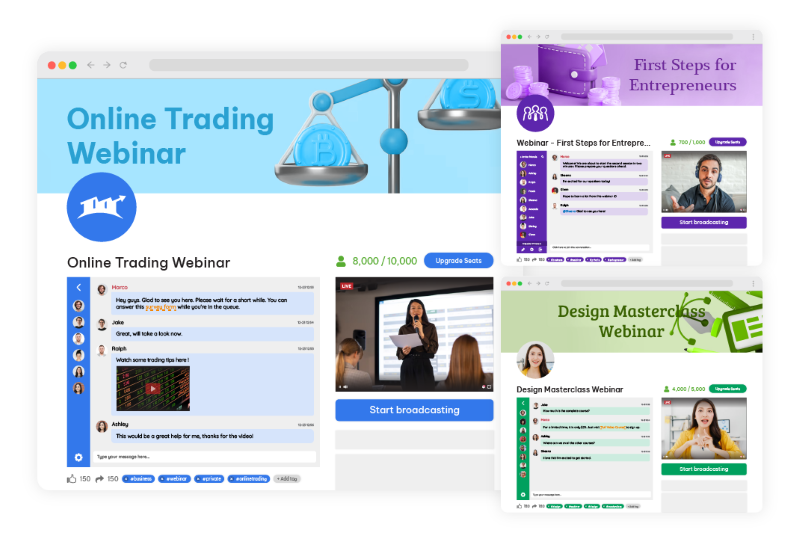
The visual and structural aspects of your landing page are more than aesthetic choices; they are the silent architects of user experience. This section discusses design and layout considerations, highlighting the importance of consistent branding, a clear hierarchy of information, judicious use of white space, and mobile responsiveness. Furthermore, we also share statistics on why these aspects can’t be overlooked.
webinar landing page

Consistent Branding

Cohesion is key. Ensure your landing page aligns seamlessly with the branding of your webinar, creating a unified and polished online experience. Accordingly, a consistent presentation of a brand has been shown to increase revenue by up to 23%.

Clear Hierarchy

Establish a clear hierarchy of information on your landing page, ensuring that visitors are guided logically through the registration process. Users spend an average of 5.59 seconds looking at a website’s written content. Therefore, critical information should stand out prominently.

White Space

Don’t underestimate the importance of white space. A clean and uncluttered layout can make your landing page look inviting and easy to navigate. It can also increase comprehension by 20%.

Mobile Responsiveness

With mobile users accounting for 52.6% of website traffic, optimizing your landing page for mobile devices is essential. Fortunately, Pageinar is optimized for mobile devices to guarantee a seamless user experience across all platforms.

Optimizing Content for Conversion

Content is king, especially in the digital realm, but it’s not just about the quantity; quality reigns supreme. In this segment, we uncover strategies for content optimization that emphasize benefits over features, leverage social proof, create urgency, and champion simplicity. Then, we’ll back these strategies with compelling statistics that reinforce their effectiveness.

  • Highlight Benefits: Shift the focus from features to benefits. Outline the tangible benefits attendees will gain from the webinar, showcasing how it will address their pain points and provide solutions. Benefits-focused content can also boost conversion rates by up to 31%.
  • Use Social Proof: Incorporate testimonials or social proof to bolster credibility. In addition, real-life success stories and endorsements from previous attendees can be powerful persuasive tools.
  • Create Urgency: Utilize scarcity tactics or limited-time offers to infuse a sense of urgency. FOMO (Fear of Missing Out) can be a compelling motivator for potential attendees to register promptly.
  • Keep It Simple: Keep your content simple and easy to understand. 94% of visitors cited web design as the reason they mistrusted or rejected a website. Make your content straightforward and accessible, avoiding jargon or technical terms that might alienate potential attendees.

Call-to-Action (CTA) Strategies

The ‘Register Now’ or ‘Join Us’ button may seem simple, but its role is paramount in guiding visitors towards action. This part of our guide explores the nuances of effective CTA strategies, from clarity and prominence to action-oriented language and the strategic placement of multiple CTAs. Data-backed insights reveal the impact these tactics can have on conversion rates.

Clear and Prominent CTA

The CTA should be prominently displayed and impossible to overlook. Its language should also be action-oriented, encouraging visitors to register immediately. Using a first-person CTA like “Register Now” can increase conversion rates by 90%.

Use Action-Oriented Language

Craft CTAs that employ action-oriented language, compelling visitors to take that crucial step toward registration.

Multiple CTAs
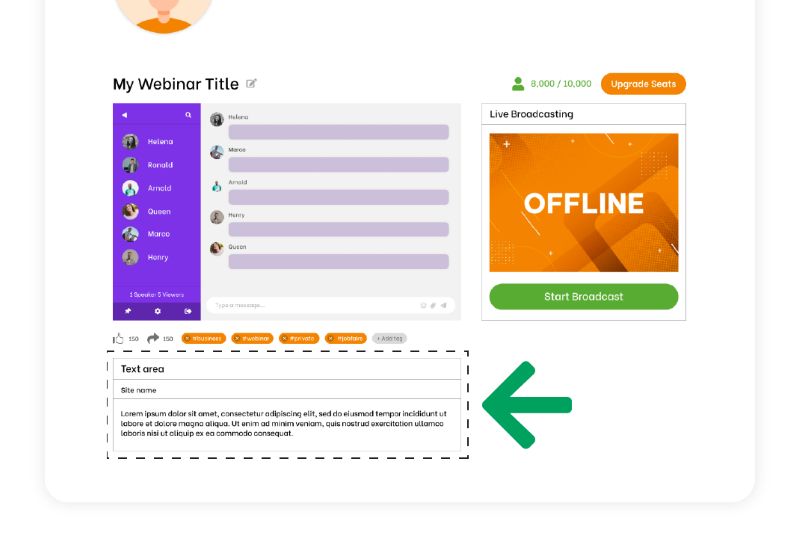
Don’t rely on a single CTA. Scatter multiple CTAs strategically throughout the landing page to reinforce the message and opportunities for conversion. Moreover, multiple CTAs provide additional touchpoints to reinforce the primary message and value proposition of your webinar. Visitors may not be convinced by a single prompt, but when they encounter CTAs at various points on the page, it reinforces the idea that the webinar is worth attending.

Continuously test various CTAs and optimize your landing page based on user behavior and conversion rates. Data-driven decisions can significantly enhance effectiveness. Regularly testing different CTAs and optimizing based on user behavior can improve your landing page’s effectiveness. A/B testing has been shown to increase conversions by 49%.

A Walkthrough of Creating an Ideal Landing Page
landing page

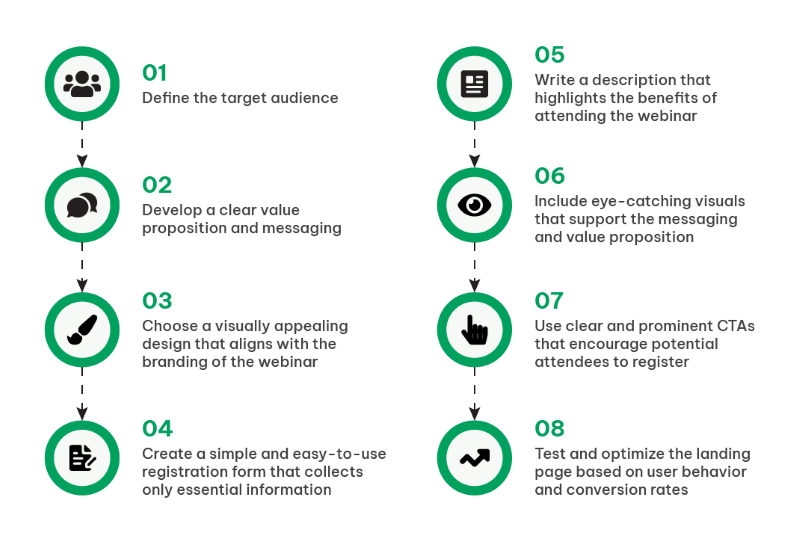
To bring it all together, let’s embark on a practical journey through the creation of an ideal landing page. This section provides a step-by-step walkthrough, from defining your target audience and crafting a compelling value proposition to selecting a design, streamlining registration forms, writing benefit-driven content, incorporating visuals, and strategically implementing CTAs.

Step 1. Define the Target Audience

Thoroughly understand your target audience’s needs and preferences. Understanding your audience goes beyond demographics; it’s about grasping their pain points, goals, and what drives their decisions. Look into data analytics to segment your audience effectively. Identify where your potential attendees hang out online, their browsing habits, and what topics resonate with them. Then, utilize data to create detailed personas that guide your messaging and content.

Step 2. Develop a Clear Value Proposition

Craft a compelling and unique message that communicates why your webinar is a can’t-miss event. Your value proposition should be concise, yet compelling. Dive deep into the benefits your webinar offers. Statistics also show that webinars focusing on solving a specific problem or providing actionable insights tend to have higher registration rates. Furthermore, use A/B testing to fine-tune your value proposition’s wording and presentation for optimal impact.

Step 3. Choose an Appealing Design

Select a visually pleasing design that harmonizes seamlessly with your webinar’s branding. Design is your silent ambassador. Conduct A/B tests with different designs to understand what resonates with your audience. In addition, use heatmaps and user testing to see how visitors interact with your page. With Pageinar, you can also incorporate responsive design principles to ensure that your landing page is accessible and engaging across various devices.

Step 4. Create a Simple Registration Form

Streamline the registration process by collecting only essential information, reducing friction. Lengthy registration forms can be off-putting. Data supports that shorter forms lead to higher conversion rates. For instance, collect only essential information initially, such as name and email. You can gather more data post-webinar or during the nurturing process. Additionally, consider using social login options, which can increase conversions by simplifying the process.

Step 5. Write Benefit-Driven Content

Emphasize the real-world benefits attendees will accrue from your webinar, ensuring they understand the value proposition. Craft content that speaks directly to the pain points of your audience. Statistics reveal that headlines emphasizing solutions or benefits perform better than generic ones. Use storytelling to illustrate how your webinar can transform attendees’ lives or businesses. Then, include data-backed insights and case studies to substantiate your claims. Remember, the focus should be on what attendees will gain.

Step 6. Incorporate Eye-Catching Visuals

Utilize images and videos that reinforce your messaging and grab the visitor’s attention. Visuals play a pivotal role in holding visitor attention. Test different images and videos to see what resonates. Research indicates that video content can significantly boost engagement. Ensure that your visuals align with your messaging and highlight key points. For instance, infographics are an effective way to condense complex information into digestible visual formats.

Step 7. Implement Clear CTAs

Ensure your CTAs are clear, action-oriented, and well-placed, guiding visitors toward registration. Moreover, CTA buttons should be prominent and easily distinguishable. Research reveals that CTA buttons with contrasting formatting tend to perform better. Test different CTA copies, such as “Register Now,” “Save My Spot,” or “Join the Webinar.” Implement urgency tactics like countdown timers if applicable. Moreover, use A/B testing to find the most effective CTA placements.

Step 8. Test and Optimize

Regularly monitor user behavior and conversion rates, allowing data to guide your improvements and enhancements. Various tools can also provide invaluable insights into user journeys. Analyze bounce rates, time spent on the page, and drop-off points in your registration process. Test various elements, from headlines to CTA button colors, and use data to guide your decisions. Moreover, optimization is an ongoing process, ensuring your landing page continues to perform at its best.

Understanding why the Structure of Landing Pages is Important

One cannot overstate the significance of meticulously designing a landing page. It serves as your digital stage, the platform where you engage, persuade, and ultimately convert your audience. This process transcends the mere amalgamation of text and imagery; it represents a strategic fusion of art and science.

Therefore, understanding your target audience is pivotal. To craft a compelling value proposition that deeply resonates, you must intimately acquaint yourself with their needs and preferences. The design of your landing page should not only be aesthetically pleasing but also seamlessly aligned with your webinar’s brand identity.

Nonetheless, this journey is an ongoing one, characterized by constant analysis and optimization. Monitoring user behavior and conversion rates yields invaluable insights, which, in turn, inform improvements and enhancements.

As you embark on the creation of your ideal webinar landing page, remain mindful of its dynamic nature. The digital landscape and audience preferences are in constant flux. So, embrace data and analytics as your compass, ready to adapt and refine continually. This endeavor extends beyond a single webinar; it encompasses the cultivation of a brand and the nurturing of a dedicated community.

By adhering to the fundamental steps in this guide and staying attuned to the ever-evolving digital environment, you are on your way to constructing landing pages that not only fill webinar seats but also engage, inspire, and cultivate profound connections with your audience. Landing pages like Pageinar are not mere entry points; they represent the opening chapter of a compelling narrative that you are set to unfold. Thus, convey it with finesse and let your webinars radiate with brilliance.
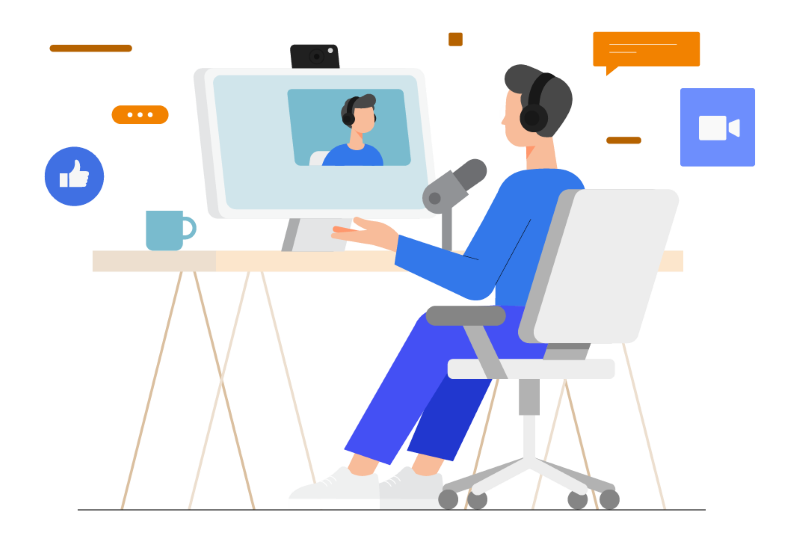
A Case Study on Increasing Business Revenue Through Online Education

In a world where digital tools continue to redefine how we communicate, educate, and do business, many professionals are turning to webinars as a way to expand their reach and deliver value at scale. For Jonas Holloway, a passionate digital marketing consultant, transitioning to online education was not just a strategy-it was a turning point. Faced with the challenge of teaching clients across multiple locations without compromising quality, Jonas needed a robust solution that would empower him to deliver high-value content seamlessly. His answer came in the form of Pageinar, a revolutionary webinar platform for online education that allowed him to transform his passion into a powerful and profitable teaching model.

Background: Who is Jonas Holloway?

The Challenge: Delivering Quality Education Without Boundaries

Jonas had built a strong reputation as a local digital marketing consultant. His one-on-one sessions and workshops were effective, but limited in scale. As demand for his services grew, so did the need for a more scalable solution.

Teaching multiple clients across various locations became increasingly difficult to manage in-person. He wanted to share his expertise without being bound by geography or physical time constraints, and more importantly, he didn’t want to compromise the quality of his content just to reach more people.

That’s when he began exploring the potential of hosting webinars as a new medium for education and audience engagement.

The Turning Point: Discovering Pageinar

While there are countless tools in the market claiming to be the best webinar platform for online education, Jonas was meticulous in his research. He evaluated platforms based on user experience, live engagement tools, content flexibility, and customization options. After testing several options, he came across Pageinar, a rising solution that stood out for its webinar-in-a-page concept-an approach that consolidates all key webinar components into a single, customizable landing page.

Jonas decided to explore the world of webinars, a medium that would allow him to transcend geographical boundaries and share his knowledge effectively. He realized that teaching online could be a pivotal strategy in boosting his revenue.

Pageinar’s intuitive interface, picture-in-picture functionality, and interaction tools like live polls and chat rooms immediately caught his attention. It wasn’t just another virtual meeting tool-it was a full-fledged education hub. With Pageinar, Jonas could create a branded experience, engage with his audience in real-time, and run seamless live sessions-all without requiring attendees to switch tabs or navigate complicated software.

Implementation: Building a Scalable Online Education Model

Once Jonas chose Pageinar, he began building a comprehensive online teaching strategy. The platform’s flexibility allowed him to map out each phase with precision, from content development to webinar promotion and live delivery.

1. Selecting the Right Webinar Platform

Jonas’s platform selection process was rooted in clarity and purpose. He knew he needed a tool that supported interactivity, allowed branding flexibility, and was user-friendly for both host and participants. Pageinar met all these needs. It gave him the ability to design a unique, branded landing page for each webinar, host live sessions without lag, and include interactive tools that would keep participants engaged from start to finish. The platform’s picture-in-picture mode became a favorite feature, enabling users to multitask while still tuning into the session-a game-changer for busy professionals.

2. Crafting High-Value Educational Content

Content creation was the next big step. With over a decade of experience in digital marketing, SEO, and social media strategy, Jonas developed tailored modules for different types of learners-from beginners to advanced marketers. He broke down each topic into digestible sections and used Pageinar’s media-friendly format to blend slides, visuals, and talking points into a dynamic presentation. The ability to customize the flow of the session meant he could keep things engaging and adapt the delivery to the audience’s response.

3. Building a Multi-Channel Marketing Strategy

To attract attendees to his webinars, Jonas implemented a robust digital marketing plan. He promoted his sessions across social media platforms, used email marketing to notify his subscriber base, and embedded registration links directly on his website. Since each Pageinar webinar had its own customizable landing page, it was easier to create targeted campaigns for specific topics. He also utilized testimonials from past consulting clients as social proof, further increasing sign-ups and driving organic traffic to his webinar pages.

4. Hosting Interactive Live Webinars

When it came time to go live, Pageinar delivered an exceptional hosting experience. Jonas used the platform to run real-time Q&A sessions, launch live polls during presentations, and maintain an ongoing dialogue through chat rooms. Participants didn’t just attend-they interacted. The picture-in-picture functionality ensured that users could stay tuned in while checking reference materials or taking notes on other tabs. The fluidity of the platform allowed Jonas to focus on teaching rather than managing technical issues, making each session smooth and professional.

Engagement and Interaction: Building a Learning Community

One of the most powerful features of Pageinar for Jonas was the community-building aspect. Unlike platforms that treat webinars as one-way lectures, Pageinar supports two-way interaction. During each session, Jonas encouraged attendees to ask questions, share experiences, and connect with each other in chat threads.

These interactions fostered a sense of belonging, turning his webinars into vibrant learning communities. Post-webinar discussions continued in dedicated chat spaces, and participants often shared insights and success stories based on the lessons they applied. This ongoing engagement helped Jonas establish trust, loyalty, and recurring attendance among his viewers.

Results: How Pageinar Transformed Jonas’s Business

The impact of using Pageinar as a webinar platform for online education was substantial-and measurable. In just a few months, Jonas experienced growth in several key areas of his business.

online education

1. Expanded Global Reach

Prior to launching webinars, Jonas’s audience was confined to local clients and referrals. With Pageinar, his reach became international. Attendees from the U.S., Canada, the UK, and Southeast Asia began joining his sessions. His participant count grew from a handful of clients per session to over 100 attendees in some webinars, with active participation increasing from 5% to 20%. The platform enabled him to scale his knowledge-sharing efforts without borders.

2. Improved Time Efficiency

Online teaching gave Jonas greater control over his schedule. He could host multiple sessions in a single day without the need for travel or venue booking. The streamlined webinar-in-a-page setup meant less time preparing logistics and more time focusing on content delivery and client interaction. As a result, he maintained his one-on-one consulting services while growing his webinar-based education offerings in parallel.

3. Revenue Diversification

Perhaps the most significant outcome was the diversification of Jonas’s income stream. Webinars quickly evolved from a side project to a core business component. He introduced tiered webinar packages-free sessions for beginners and paid masterclasses for advanced topics. Within a few months, webinars contributed to a notable increase in revenue, adding consistency and predictability to his earnings.

4. Positive Feedback and Reputation Growth

The feedback Jonas received from his webinar attendees was overwhelmingly positive. Participants praised the clarity of his explanations, the ease of use of the Pageinar platform, and the interactive nature of each session. Many shared their testimonials on social media, and word-of-mouth referrals further boosted attendance. With each webinar, Jonas’s credibility as a digital marketing educator solidified, earning him recognition in industry circles and new consulting opportunities.

Jonas Holloway’s journey from a local consultant to a global educator is an inspiring tale of innovation and adaptation in the modern business world. Through his strategic use of a webinar platform like Pageinar, John managed to increase his business revenue while sharing his expertise with a broader audience. His case highlights the transformative power of online education for entrepreneurs looking to enhance their businesses and inspire others along the way.

Key Takeaways for Entrepreneurs and Educators

Jonas Holloway’s story is a compelling example of how a webinar platform for online education can catalyze professional growth. By selecting a platform that prioritizes user experience, customization, and engagement-like Pageinar-he successfully transformed from a local consultant into a global educator. His journey underscores several key lessons for others in similar positions:

  • Choose the right tools: Don’t settle for generic webinar platforms. Look for one like Pageinar that combines ease of use with rich features and branding flexibility.
  • Value interaction: Today’s learners crave engagement. Real-time chats, Q&As, and polls transform passive viewers into active participants.
  • Scale smartly: With the right platform, you don’t need to sacrifice quality for scale. Pageinar’s seamless setup and robust support make it easy to host multiple, high-quality sessions regularly.
  • Promote strategically: Use multi-channel marketing to drive registrations and maximize your reach. Social media, emails, and testimonials all play a role.
  • Be consistent: The more value you offer through consistent webinars, the more trust and credibility you build over time.

Final Thoughts: Is Pageinar Right for You?

If you’re an entrepreneur, educator, or coach looking to scale your expertise, connect with a wider audience, and build a thriving online community, Pageinar is the webinar platform for online education that can make it happen.

Jonas’s success isn’t just a one-off story-it’s a roadmap for anyone ready to take control of their digital presence and deliver impactful, engaging virtual sessions. With intuitive tools, interactive features, and reliable support, Pageinar empowers professionals to turn knowledge into influence and passion into profit-all from a single page.

Engage and Learn: How to Execute a Successful Live Webinar

In today’s trend of live streaming, a live webinar stands out as a powerful tool for connecting with audiences. A live webinar is a real-time, interactive video conference utilized by companies to connect with broader audiences across various regions. Participants have the ability to view and listen to the online presentation, engaging with the host through features like Q&A sessions, live polls, discussions, and more.

According to a report, webinars have an average attendance rate of 40-50%. This signifies a substantial engagement potential for businesses.

Whether you’re a seasoned webinar host or stepping into this exciting realm for the first time, join us on this journey to discover the keys to engagement and learning that will elevate your live webinars to new heights.

Planning a Live Webinar

Planning a live webinar requires meticulous consideration of goals, audience, and content. Let’s delve into the key aspects of this crucial phase.

Before diving into the logistics, articulate the purpose of your webinar. Are you aiming for increased engagement, lead generation, or enhanced brand awareness? Define clear, measurable objectives to guide your efforts.

It’s equally important to select a topic that resonates with your audience. The chosen subject should align with your overall content strategy, ensuring consistency and reinforcing your brand message.

Crafting a successful webinar begins with understanding your audience. Create detailed audience personas to tailor your content and messaging. This ensures a more personalized and engaging experience for your participants.

Lastly, go beyond demographics. Dive into the needs and preferences of your audience. What challenges do they face? What content format do they prefer? Gathering this data allows you to tailor your webinar to precisely meet your audience’s expectations.

By defining your goals, choosing compelling topics, understanding your audience, and analyzing their preferences, you set the foundation for a webinar that resonates and delivers value.

Selecting the Right Live Webinar Platform

live webinar

Choosing the appropriate webinar platform is crucial for a seamless event. Let’s explore the landscape of popular platforms and the factors to consider for a wise decision.

Overview of Popular Live Webinar Platforms

Several platforms cater to diverse needs. Some popular options include Zoom, GoToWebinar, and Microsoft Teams. Each platform has its unique features and strengths.

Zoom

  • Key Features: User-friendly interface, breakout rooms, and interactive elements.
  • Strengths: Excellent for smaller to large-scale webinars with a focus on interaction.

GoToWebinar

  • Key Features: Robust analytics, easy screen sharing, and pre-recorded webinars.
  • Strengths: Ideal for data-driven marketers seeking in-depth insights.

Microsoft Teams

  • Key Features: Integration with Microsoft 365, collaborative tools, and participant management.
  • Strengths: Best suited for organizations already using Microsoft’s ecosystem.

Pageinar

  • Key Features: Serves as a landing page, picture-in-picture mode, and has a chat room.
  • Strengths: Ideal for webinar beginners who don’t want to create an entire website.

Factors to Consider

FactorWhat to Consider
Audience SizeDetermine the maximum number of participants the platform supports.
InteractivityAssess features like polls, Q&A sessions, and chat for participant engagement.
BudgetConsider costs, especially if you’re a small business or an individual.

TL;DR – Quick Guide to Choosing

  • Audience Size: Check if the platform supports your expected number of participants.
  • Interactivity: Ensure the platform has features for engagement like polls and Q&A.
  • Budget: Consider the costs, especially if you’re on a tight budget.

Technical Setup and Rehearsals

Ensuring a smooth webinar experience involves a robust technical setup and well-planned rehearsals. Let’s look into the essential aspects.

Testing Audio, Video, and Internet Connectivity

Before your big day, it’s crucial to conduct thorough tests.

  • Audio Check: Ensure your microphone is clear, and participants can hear you without distortion.
  • Video Quality: Check your camera to ensure a crisp and clear image.
  • Internet Connection: Confirm a stable internet connection to prevent disruptions.

Conducting Rehearsals for a Glitch-Free Presentation

Rehearsals are your secret weapon for a glitch-free presentation.

  • Run-Through: Practice your entire presentation to identify any potential hiccups.
  • Interaction Test: Check interactive elements like polls and Q&A to ensure they function smoothly.
  • Timing: Practice your timing to ensure you stay within the allocated timeframe.

A bit of preparation goes a long way. By diligently testing your equipment and running through your presentation, you’ll be well-prepared to deliver a seamless webinar experience.

Creating Compelling Webinar Content

Crafting engaging content is the heart of a successful webinar. Let’s explore the key components with a personal touch.

Begin with a clear structure.

  • Introduction: Set the stage by introducing yourself and the topic.
  • Main Content: Organize your material logically for easy understanding.
  • Conclusion: Summarize key points and leave your audience with a lasting impression.

Visuals speak volumes.

  • Images and Graphics: Use relevant visuals to enhance your message.
  • Multimedia: Incorporate videos or slideshows to diversify your content.

Engage your audience actively.

  • Polls: Pose questions to gather instant feedback.
  • Q&A Sessions: Allocate time for participants to ask questions.
  • Chats: Encourage real-time conversations among participants.

Guide your audience’s next steps.

  • Relevant CTAs: Integrate prompts that align with your webinar’s goals.
  • Drive Actions: Encourage participants to visit your website or subscribe.

Find the sweet spot.

  • Educational Value: Prioritize providing valuable insights.
  • Promotional Elements: Integrate promotional content strategically.

By structuring your presentation, incorporating engaging elements, and balancing promotion with value, you’ll create a webinar that captivates your audience from start to finish.

Promoting Your Live Webinar

One of the crucial steps in ensuring a successful live webinar is effective promotion. 

When it comes to your webinar’s online presence, the landing page acts as the virtual front door. Design it to be not only visually appealing but also informative. 

Consider it an invitation, providing essential details about the webinar, including what participants can expect and why they should attend. You should also include a user-friendly registration form, ensuring a seamless sign-up process.

Email marketing and social media are important tools for generating buzz. It’s important to utilize email campaigns to build anticipation. For example, craft compelling messages that highlight the value participants will gain. Then, make registration easy by including clear CTAs in your emails. 

Simultaneously, harness the power of social media for pre-event promotion and engagement. Share also sneak peeks, intriguing content, and countdowns to create a sense of excitement. Encourage your audience to share the event, amplifying its reach.

In essence, your promotion strategy is the gateway to a successful live webinar. A well-designed landing page and strategic use of email and social media can significantly impact the turnout and engagement during your online event.

Executing the Live Webinar

Now comes the moment you’ve been working toward: the live webinar itself. We’ll explore some best practices and tips to ensure your presentation is engaging and glitch-free.

Delivering a dynamic presentation is key to keeping your audience captivated. Speak clearly, vary your tone, and use visuals to complement your message. Share real-world examples or stories to make your content relatable.

Feeling nervous is normal, even for seasoned presenters. Before you go live, take a deep breath, remind yourself of your expertise, and visualize a positive outcome. Confidence is contagious, and your audience will respond positively.

Despite careful preparation, technical issues may arise. Have a strategy for troubleshooting common problems in real time. This could involve a backup internet connection, knowing how to quickly reset devices, or having a technical support team available.

Lastly, always have a backup plan. Consider what you’ll do if your main presentation tool encounters an issue. Additionally, having a support team, even if it’s just one or two individuals, can be invaluable. They can monitor the chat for questions, assist with technical issues, and ensure the overall smooth running of the webinar.

Post-Webinar Activities

Congratulations on delivering a successful live webinar! Let’s explore the crucial post-webinar activities that will help you maintain momentum and improve future events.

Firstly, reach out to your participants with thank-you emails. Express your gratitude for their attendance and briefly highlight the key takeaways from the webinar.

In your emails, also consider including a link to a post-webinar survey. This provides an opportunity for participants to share feedback. Keep the survey concise.

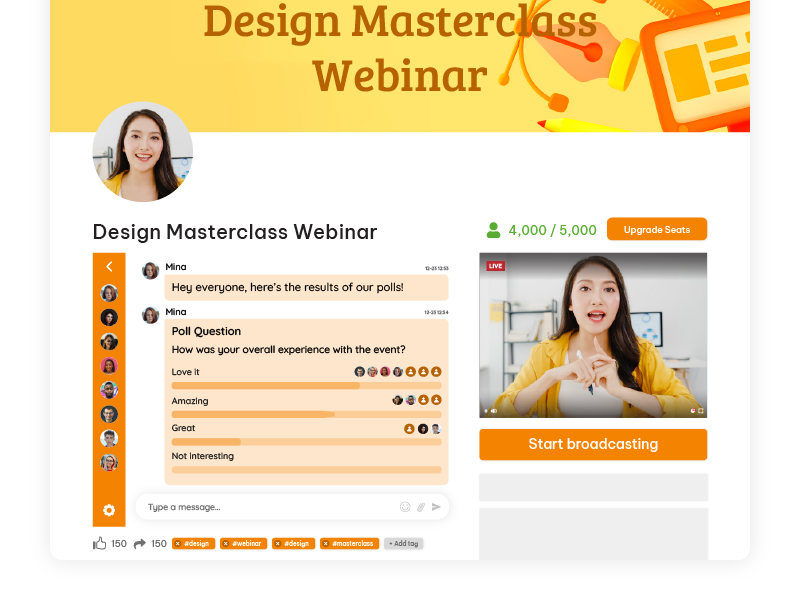
With Pageinar, you can send out polls in the chat room. After your live webinar, you can send out a chat poll to let your audience vote on what they liked and what areas need improvement. Then, they can also leave feedback on the chat room and you can export it for future use.

live webinar

Share any additional resources discussed during the webinar or related to participants’ questions. This could be in the form of articles, whitepapers, or links. It adds value and keeps the engagement alive.

After that, look at attendance rates, engagement levels, and participant feedback. Identify what worked well and areas that need improvement. This data is gold for refining your future webinar strategies.

Evaluate success not just by the number of attendees but by the impact of your message. Did participants stay engaged? Did you meet your goals? Use these insights to refine your approach for the next webinar.

Don’t just collect data; use it. Whether it’s adjusting your content strategy or improving technical aspects let the data guide your decisions. The beauty of webinars is their iterative nature; each one is an opportunity to learn and grow.

Remember, the end of a webinar is not the end of your engagement. By thoughtful follow-ups, feedback collection, and data analysis, you’re setting the stage for even more impactful webinars in the future. Keep the momentum going!

Continuous Improvement and Future Webinars

As you enjoy in the success of your recent live webinar, it’s time to look forward, fueled by the lessons learned and the feedback received.

Participants’ insights are invaluable. Take the time to review the feedback received in post-webinar surveys. Identify recurring themes or suggestions. This not only demonstrates a commitment to improvement but also makes your audience feel heard and valued.

Webinars are dynamic, and so should be your approach. Consider each webinar as a stepping stone toward perfection. Reflect on what worked well and what could be enhanced. Iterate your strategy accordingly, focusing on refining elements that resonate with your audience.

Every webinar is a learning opportunity. Perhaps there were technical hiccups or moments of exceptional engagement. Document these experiences and, most importantly, implement the lessons learned. This iterative process ensures each webinar is better than the last.

The digital landscape evolves, and so do best practices for webinars. Stay informed about the latest industry trends and technological advancements. Moreover, attend webinars yourself, explore online resources, and engage with communities. Being in the know ensures your webinars stay fresh and aligned with current expectations.

Remember, the journey of hosting webinars is a continuous one. It’s not about achieving perfection but about embracing growth. By adapting to feedback, refining your strategy, learning from experiences, and staying attuned to industry shifts, you’re not just hosting webinars; you’re delivering impactful, evolving experiences.

Unleashing the Power of Live Webinars

As we end this guide on hosting live webinars, let’s look back at the essential steps and considerations that pave the way for success.

Hosting a live webinar is an art that combines meticulous planning, engaging content creation, and seamless execution. From defining clear goals to selecting the right platform, and from promoting your event to analyzing metrics, each step contributes to the overall success of your webinar. This guide has also walked you through these crucial elements, providing insights and tips to ensure each facet of your webinar is finely tuned.

Now equipped with the knowledge bestowed by this guide, it’s time to take action. Embrace webinars not just as a tool but as a dynamic force for audience engagement and business growth. Moreover, use the interactive nature of webinars to connect with your audience on a deeper level, share valuable insights, and drive your business objectives.

Webinars are not merely events; they are opportunities to forge meaningful connections, showcase expertise, and propel your brand forward. As you embark on your live webinar journey, remember that each one is a chance to refine your skills, learn more about your audience, and elevate your online presence.

Benefits of Pageinar and Why It Should Be Your Top Webinar Platform Choice

In the dynamic landscape of virtual communication, webinars have emerged as indispensable tools for engagement and knowledge dissemination. As businesses and educators increasingly harness the power of webinars, choosing the right webinar platform becomes pivotal. 

This blog explores the multifaceted advantages of Pageinar, a new webinar platform redefining the experience for hosts and participants alike.

The Power of Having Your Own Landing Page

In the vast realm of the internet, a dedicated landing page for webinars stands as a strategic cornerstone. Pageinar recognizes this, offering users the power to carve out their unique digital space. The ability to brand and customize landing pages not only enhances visual appeal but also provides SEO advantages. A branded landing page becomes an extension of your identity, offering a seamless experience for participants and increasing overall visibility.

Unparalleled Customization with Pageinar

Pageinar takes customization to new heights. The platform understands that a one-size-fits-all approach doesn’t resonate with diverse brands and content. Users can tailor every aspect of their webinar-from color schemes to fonts-to align with their unique brand identity. This level of personalization not only fosters brand consistency but also significantly augments user experience, leading to increased engagement.

Multitasking Made Easy with Picture-in-Picture

One of Pageinar’s standout features is the innovative Picture-in-Picture mode, reshaping how participants interact with content. In a world where attention spans are fleeting, the ability to multitask during a webinar is a game-changer. Pageinar’s Picture-in-Picture function allows users to engage in side discussions, take notes, or refer to additional material-all while still being part of the primary webinar. This not only enhances user experience but also boosts overall engagement.

Why Picture-in-Picture Matters in a Webinar Platform:

  1. Uncommon in Webinar Platforms: Traditional webinar platforms often lack the sophistication of Picture-in-Picture functionality. Pageinar breaks away from the norm, acknowledging that participants may need to take notes, refer to supplementary materials, or engage in side discussions without missing out on the primary content. This uncommon feature significantly enhances the practicality of webinars.
  2. Enhancing User Engagement: In a world where attention spans are at a premium, engaging participants is a challenge. Picture-in-Picture addresses this challenge by allowing users to stay connected to the core content while performing additional tasks. This not only keeps participants invested but also ensures that the webinar remains a dynamic and interactive experience.
  3. Empowering Participants: PiP empowers participants to tailor their webinar experience to their unique needs. Whether it’s referring to additional resources, taking notes, or participating in parallel discussions, users can exercise control over their engagement. This customization fosters a sense of autonomy, contributing to a more positive and impactful webinar experience.

Pageinar vs. Other Platforms

Comparatively, Pageinar’s Picture-in-Picture feature stands out as a webinar tool. Many conventional platforms lack this level of flexibility, often requiring users to choose between engaging with the primary content or diverting attention to other tasks. Pageinar’s commitment to addressing this limitation positions it as a frontrunner in the webinar platform landscape.

Future Implications as a Webinar Platform

As the digital landscape evolves, multitasking during webinars is likely to become an increasingly valued feature. The current work and learning environments demand tools that accommodate diverse needs, and picture-in-picture aligns with this trajectory. Pageinar’s foresight in integrating such features not only meets the current demand but also positions it as a future-ready platform, anticipating and adapting to evolving user requirements.

To use the feature, all you need is to sign up. No need to embed or integrate it to an existing website or application. It’s a standalone webinar platform that also acts as a landing page. Just sign up and you’re ready to go.

Seamless Design and User-Friendly Interface

webinar platform

Pageinar recognizes that a webinar platform is not an isolated tool but part of a larger ecosystem. Setting up a webinar should be intuitive, and Pageinar delivers on this front. Its user-friendly interface ensures that hosts and participants can navigate effortlessly, making the entire process from setup to participation smooth and hassle-free.

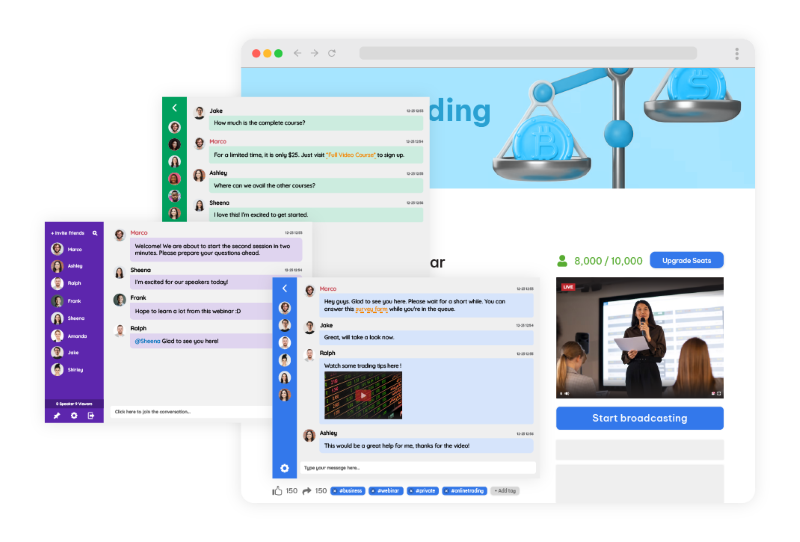
With its chat room, hosts and participants can speak simultaneously. There’s also an array of chat types that hosts can choose from. They can choose what’s best for their audience and the webinar topic they’re discussing.

Real-life success stories of Pageinar as a webinar platform

The true test for any webinar platform lies in the success stories of its users. Pageinar boasts a repertoire of case studies and testimonials from users who have experienced tangible benefits.

For instance, in this case study, Jonas, an entrepreneur, found Pageinar very helpful. As he was on the lookout for a webinar platform to use, he found Pageinar.

Now, he’s using it to teach his audience about increasing the revenue of their businesses. He has seen a whopping 20% increase in audience participation compared to other webinar platforms.

Comparative analysis

webinar platform

In a crowded market, Pageinar stands out. A comparative analysis with other popular webinar platforms illuminates the unique features that distinguish Pageinar. Whether considering pricing, user reviews, or overall user experience, Pageinar consistently emerges as a top contender.

Even as a new webinar platform, Pageinar can face with other platforms already established in the market. With features like Picture-in-Picture, it has presents an advantage over its competitors because of the ability to multitask while there’s an ongoing webinar.

This is a game-changer for most audience since they can listen and watch the webinar even while they’re doing other tasks.

Addressing security concerns

As the digital landscape evolves, so do concerns about data security and privacy. Pageinar understands the paramount importance of safeguarding user data. The platform is designed with robust security measures, ensuring compliance with privacy regulations and employing encryption protocols to protect sensitive information. Users can engage with confidence, knowing that their data is secure.

The Future of Webinars with Pageinar

pageinar webinar platform

Pageinar doesn’t rest on its laurels. The platform is forward-looking, anticipating the needs of users in a rapidly evolving digital landscape. This section explores potential future updates and features, emphasizing Pageinar’s commitment to adapting to changing technology and user requirements. Choosing Pageinar isn’t just a decision for today; it’s an investment in the future of webinar technology.

Why choose Pageinar as your webinar platform

pageinar webinar platform

Pageinar emerges as a frontrunner in the competitive field of webinar platforms. Its emphasis on a customizable landing page, unparalleled user customization, innovative multitasking features, seamless integration, and robust security measures make it a comprehensive solution for diverse needs.

As businesses and educators seek a platform that not only meets but exceeds their expectations, Pageinar stands tall as a top choice, offering a holistic and engaging webinar experience. Consider Pageinar as your preferred webinar platform and elevate your virtual communication endeavors.

Hosting a Successful Webinar for Business: Proven Tactics and Best Practices

As the era of digital is continuously growing, webinars have become indispensable tools for businesses seeking to expand their reach, engage their audience, and drive growth. As a small business owner, online tutor, or coach/trainer, harnessing the power of a webinar for business can elevate your brand, attract new clients, and establish you as an authority in your field.

The rise of webinars is driven by their cost-effectiveness and ability to connect with global audiences in real time. Unlike traditional seminars, webinars eliminate the limitations of geography and physical presence, making them highly scalable. They allow for a two-way communication model that fosters engagement and builds trust. As more businesses adapt to remote-first operations and virtual client engagement, webinars have transitioned from being optional tools to essential components of a successful digital strategy. This guide aims to provide you with the proven tactics and best practices needed to host successful webinars that achieve your business objectives.

Moreover, this guide will take you through each step of the webinar hosting process, from preparation to post-event follow-up. We’ll start by discussing the importance of defining clear objectives and identifying your target audience. Next, we’ll explore crafting compelling content and promoting your webinar across multiple channels to maximize attendance. You’ll also learn about choosing the right webinar platform for your business, ensuring seamless technical setup, and delivering engaging presentations that captivate your audience.

After the webinar concludes, we’ll explore strategies for nurturing leads and gathering feedback to assess its effectiveness. Finally, we’ll discuss how to measure success using key performance indicators (KPIs) and continuously improve your webinar strategy for future events.

Preparing for Your Webinar for Business

The first step to a successful webinar starts long before the presentation. Clear goal-setting is critical. Ask yourself: Are you aiming to build brand awareness, generate qualified leads, educate your audience, or launch a product?

webinar for business

1. Define Objectives

Before diving into webinar planning, it’s essential to define clear goals and objectives. Whether you aim to generate leads, launch a new product, or educate your customers, setting specific objectives will guide your webinar strategy and measure its success.

2. Identify Your Target Audience

Understanding your target audience is crucial for tailoring your webinar content effectively. By analyzing demographics, interests, and pain points, you can create content that resonates with your audience and delivers value.

How To Craft Compelling Content

1. Choosing Topics

Selecting the right topic is key to capturing your audience’s interest and providing valuable insights. Choose subjects that address common pain points, offer solutions, and align with your audience’s interests to maximize engagement.

2. Developing Engaging Presentations

Create visually appealing slides, structure your content for clarity and impact, and incorporate interactive elements to keep participants engaged throughout the webinar. Encourage audience interaction and address questions in real-time to enhance the overall experience.

Promoting Your Webinar for Business

1. Multi-Channel Promotion

Utilize various marketing channels, such as email, social media, and your website, to promote your webinar and reach a wider audience. Consistent and targeted promotion across multiple channels will also help maximize attendance. You’ll find that your reach is continuously growing as you steadily promote your webinar.

2. Building Anticipation

Create buzz and excitement around your webinar by running teaser campaigns, creating countdowns, and offering exclusive incentives for registrants. In addition, building anticipation will increase attendance and engagement on the day of the event.

What Platform Should You Use?

When looking for a webinar for business platform, consider using Pageinar, offering unique features tailored to business needs. Pageinar is a webinar platform that operates as a landing page.

Unlike traditional webinar platforms that require multiple tools and windows to manage the event, Pageinar consolidates everything into a single landing page. This all-in-one format simplifies user experience for both hosts and participants.

Learn how Pageinar differs from its competitors and familiarize yourself with its features for seamless webinar execution.

pageinar webinar for business

Your Personalized Webinar Space: Pageinar isn’t just a platform; it’s your personalized virtual event space. Customize landing pages to reflect your brand and captivate your audience. You can tailor webinars to your brand and audience for a unique experience.

High-Level Customization: Elevate presentations with advanced customization features and add branding elements and interactive features for a memorable experience. Furthermore, you can engage your audience with visually stunning slides, live polls, and seamless presentation flow.

A Hub for Interaction and Networking: Pageinar extends beyond traditional webinars to become a hub for interaction and networking. Foster connections through live chat, Q&A sessions, and post-webinar discussions. Different chat types enable easy communication and audience engagement. Attendees can also interact, ask questions, and share insights, creating a community-driven event.

Picture-in-Picture: Experience multitasking convenience with Pageinar’s picture-in-picture feature. Picture-in-picture is not new to technology, but it’s a big feature for Pageinar as our competitors don’t have this feature. With this, hosts and participants can navigate different content while staying engaged in the main presentation. It allows flexibility for attendees to multitask on their preferred devices without missing crucial information.

Now that you have a webinar for business platform, it’s time to go to the technical side.

A seamless technical setup is crucial for delivering a professional webinar. Test all equipment in advance, including your microphone, camera, and internet connection. Choose a quiet location with good lighting and minimal distractions. Ensure that your slides and any supporting materials are ready and that your team knows their roles-whether that’s moderating the chat, handling tech support, or facilitating audience engagement.

During the webinar, maintain a conversational tone. Speak clearly, and make eye contact with the camera to establish a connection with your audience. Use body language and facial expressions to convey enthusiasm and authority. Encourage real-time interaction through chat boxes, polls, and Q&A sessions. Responding to participants by name and addressing their questions fosters a sense of community and makes attendees feel valued.

Post-Webinar Follow-Up

Once your webinar concludes, the real work begins. Promptly follow up with both attendees and registrants who couldn’t make it.

First, follow up with attendees and non-attendees through personalized emails, additional resources, and exclusive offers to nurture leads and drive conversions. Building relationships post-webinar is critical for long-term success.

Second, it’s necessary to collect participant feedback through surveys or polls to assess webinar effectiveness and identify areas for improvement. Feedback will also help you refine future webinar strategies and enhance audience satisfaction.

How To Know if Your Business Webinar is Successful

Before entering the world of webinar for business, you should know your KPIs. With this, you can measure webinar success by tracking attendance rates, engagement levels, and conversion rates. Therefore, it’s important to identify what your KPIs are to evaluate performance and inform future webinar strategies.

webinar for business

After that, you should analyze webinar data, identify strengths and weaknesses, and iterate on content and delivery to optimize results over time. For instance, if your goal was lead generation, how many attendees moved through your sales funnel post-webinar? If brand awareness was the aim, did your social media following or website traffic increase? Continuous improvement is also essential for maximizing the impact of your webinars and achieving long-term success.

Why Pageinar Is Ideal for Webinars in a Page

As mentioned earlier, Pageinar stands out for its unique “webinar in a page” format. Traditional webinar platforms often require multiple plugins or tools for registration, live chat, presentations, and follow-ups. Pageinar eliminates this fragmentation. From registration to replay, everything happens on one page. This not only enhances the user experience but also simplifies backend management for hosts.

Its built-in live chat allows for real-time interaction without needing third-party integrations. You can customize the chat type to fit your audience’s preferences-whether it’s private, moderated, or public. The flexibility in design ensures your branding is consistent and professional. Moreover, Pageinar’s analytics dashboard helps track performance metrics in real-time, giving you actionable insights immediately after the event.

Conclusion

Hosting a successful webinar for business involves more than just going live with a camera and a slide deck. It requires clear goal-setting, in-depth audience research, engaging content, strategic promotion, technical preparation, and diligent follow-up. By implementing the best practices outlined in this guide, you position your business to leverage webinars as a powerful marketing and engagement tool.

Using a platform like Pageinar, which supports the “webinar in a page” concept, further streamlines the process and enhances the participant experience. Whether you’re looking to attract new clients, establish thought leadership, or drive conversions, webinars are an effective, scalable solution that delivers measurable results. Now is the perfect time to harness the power of webinars to take your business to the next level.

By following the proven tactics and best practices outlined in this guide, you’ll be well-equipped to host webinars that drive results and propel your business forward. Ready to create your business webinar?

Webinar Landing Page: How to Build, Launch, and Convert with Pageinar

A webinar landing page is the single URL your audience uses to register, watch, and engage with your live webinar event. In fact, it is your digital front door. However, most tools force you to stitch together a registration form, a streaming service, and a chat app. That fragmentation costs you leads. Moreover, it creates technical headaches and a broken attendee experience. Pageinar’s all-in-one broadcast platform removes all of that complexity. You sign in with Google and get a fully hosted, customizable page instantly. No plugins. No code. No setup delays.

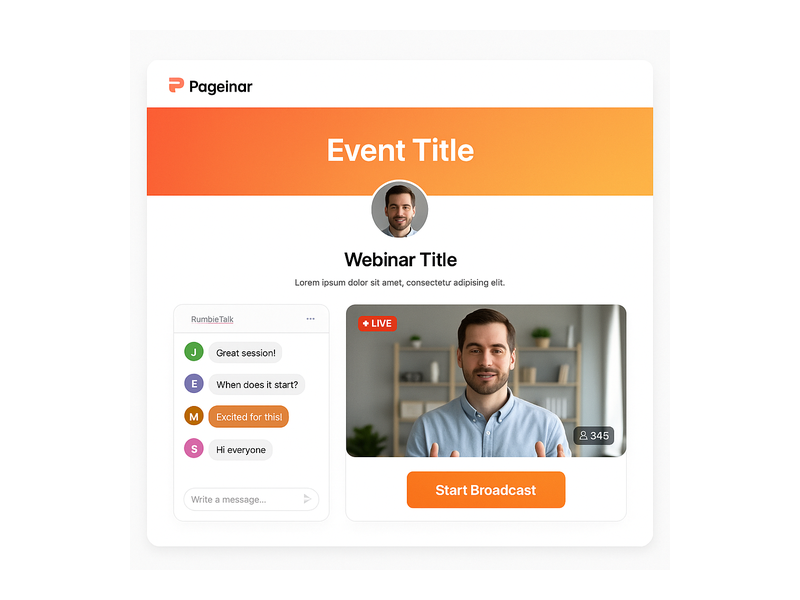
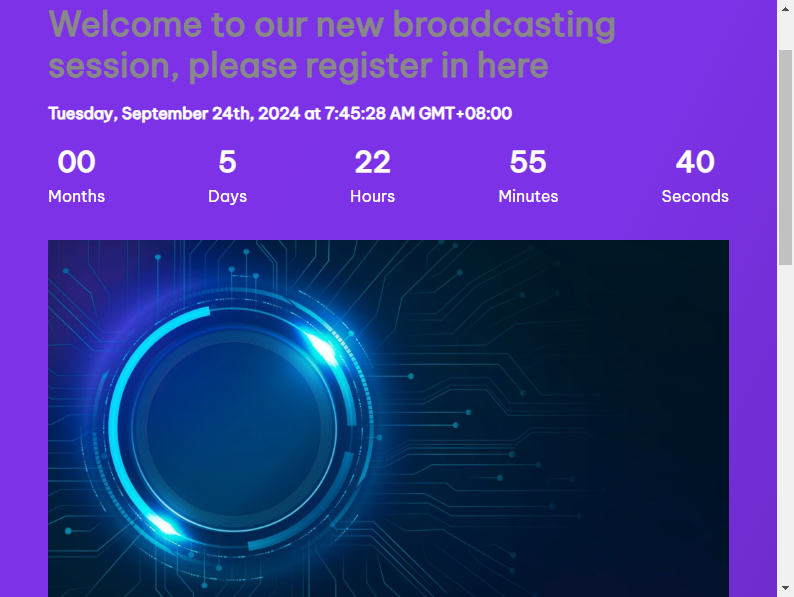
Pageinar webinar landing page showing live broadcast area and integrated chat

What Makes a Great Webinar Landing Page?

Not every webinar landing page delivers results. In fact, most event pages fail because they miss one or more of three core components. First, you need a compelling registration experience. Second, you need a smooth live broadcast environment. Third, you need a real-time audience engagement layer. Together, these three elements turn a simple URL into a high-converting event page.

A Branded Registration Experience

Before your event goes live, your page works as a registration hub. It needs to reflect your brand and make signing up easy. With Pageinar, you switch to Registration Mode with one click. That instantly activates a customizable template. For example, you can upload a header image or video. You can choose a background color and write a personalized welcome message. Additionally, you can display the event date and time and toggle a live countdown timer. That timer builds urgency as your broadcast approaches.

For B2B teams, the lead collection layer delivers real value. You can enable fields for First Name, Last Name, Company, and phone number. Moreover, you can add custom fields for your specific campaign. For instance, ask attendees about their industry or team size. Every registration flows automatically into the Registered List. As a result, your sales team gets clean lead data with no manual data entry required.

A Seamless Live Broadcast Environment

When your event begins, your broadcast page transforms into a live stage. Pageinar’s Broadcasting Mode places a large video player front and center. A Start Broadcast button appears for the host only. Attendees open the same URL they used to register. Therefore, the live stream starts immediately in their browser. No external software. No encoder setup. No RTMP keys. In short, the broadcast runs directly from your Pageinar page.

That frictionless flow from registration to live event is a major advantage. For example, a host can go from zero to live in under a minute. Attendees never navigate away. They never download anything. As a result, attendance rates stay high from start to finish.

Integrated Live Chat for Real-Time Engagement

Engagement is what separates a live webinar from a recorded video. Pageinar’s broadcast page includes a built-in RumbleTalk group chat panel. It comes with full moderation controls, multiple themes, and admin mode. Hosts can moderate questions in real time. Moreover, they can pin important messages and keep the conversation on topic. Best of all, the chat runs directly on your webinar landing page. Your attendees never leave the page to chat. As a result, engagement stays high throughout the event.

For high-profile broadcasts — events for Nasdaq, Wix, HP, and Sony Music — a professional moderated chat is a core requirement. Additionally, the questions attendees ask during a live session reveal real buying signals. That means your sales team gets valuable intelligence for follow-up outreach.

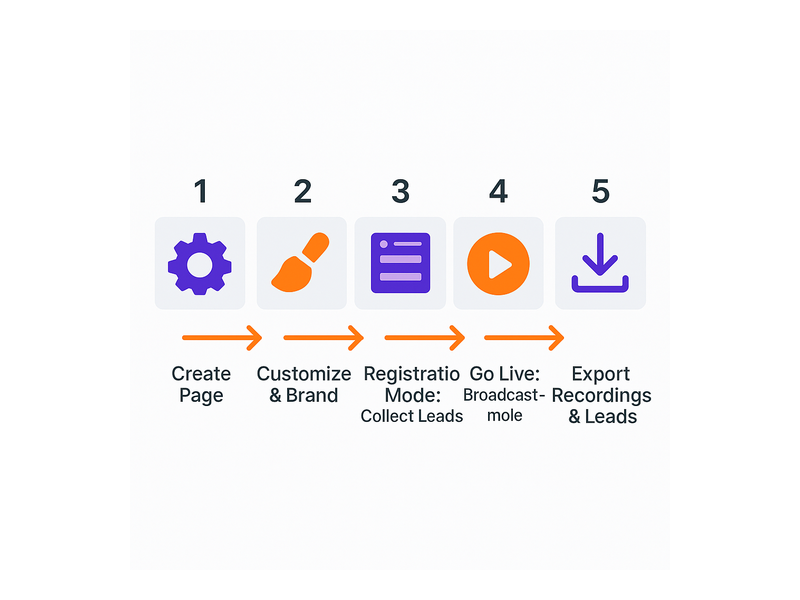
Webinar landing page setup workflow — from registration to live broadcast

How to Set Up Your Webinar Landing Page with Pageinar

Getting your webinar landing page live takes just a few minutes. Here is exactly how it works, step by step.

Step 1: Sign In with Google

Pageinar uses Google Sign-In exclusively. You authenticate once and land directly on your broadcast page. Better still, it is already live and hosted on Pageinar’s infrastructure. Therefore, no domain setup or installation is required. In other words, you start customizing immediately.

Step 2: Customize Your Page Identity

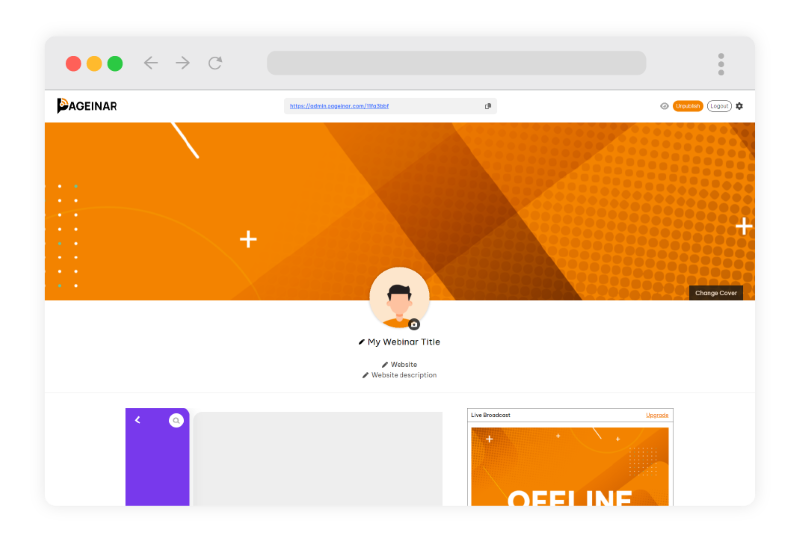
Your event page is fully editable from the main interface. Upload a cover image or choose a background color. Add your avatar and set the event title. Enter your website URL and write a compelling event description. For step-by-step guidance on every option, visit the Pageinar Knowledge Base. In fact, it covers every customization available.

Step 3: Configure Registration and Lead Collection

Open the Settings panel and go to Registration Settings. Choose your registration template and set the event date and time. Moreover, select which lead collection fields to enable. For B2B webinars, enable the Company field and at least one custom qualification field. Additionally, if your event needs access control, you can password-protect your webinar landing page from the Broadcast Settings panel.

Step 4: Set Up Your Chat Experience

In Chat Settings, select a RumbleTalk theme that matches your brand. For example, multiple visual themes are available — from minimal and professional to bold and expressive. Next, designate chat admins who will manage the conversation during your broadcast. Furthermore, set an offline welcome message for early arrivals. A well-configured chat sets a professional tone from the very first message.

Step 5: Go Live and Record Everything

Toggle your page from Registration Mode to Broadcasting Mode using the switch in the top-right corner. Click Start Broadcast. Your audience watches the live stream directly in their browser. No download needed. After the event, your Broadcast Recordings section saves every session automatically. Therefore, those recordings become on-demand content and lead generation assets you can use for months.

Step 6: Share Your Social Links

Pageinar lets you add social profile links to your event page. Connect Facebook, Instagram, Twitter, YouTube, and Twitch. In addition, these links give attendees clear paths to follow your brand after the broadcast. As a result, your event page becomes a multi-channel touchpoint — not just a one-time URL.

Webinar Landing Page Best Practices for B2B Teams

Having the right platform is only part of the equation. These best practices help B2B teams get maximum value from every webinar landing page they publish.

Lead With the Audience Outcome

Your event title is the most persuasive copy on your page. Lead with the specific result attendees will walk away with. For example, “How to Reduce Customer Churn by 30% This Quarter” converts far better than “Customer Success Webinar.” Specificity signals expertise. Moreover, it filters out unqualified registrants before they reach the form.

Keep Registration Fields Minimal

Every additional field reduces your conversion rate. Collect only what your sales team actually uses. Typically that means First Name, Last Name, Business Email, and Company. Add custom fields sparingly. However, when you do add them, make sure the data genuinely improves lead scoring. Pageinar’s field controls let you enable or disable any field without touching code.

Activate the Countdown Timer

Pageinar’s registration mode includes a built-in countdown timer. Visitors who see “14 hours remaining” register immediately instead of saving the tab and forgetting. Therefore, enable the countdown timer for every time-bound event. It is one of the simplest conversion improvements you can make at no extra cost.

Brief Your Chat Admins Before the Broadcast

Designate at least one chat admin before your event begins. Ideally, they should know the agenda and be ready to moderate from the first message. Set an offline welcome message that greets early arrivals. Furthermore, an actively moderated chat signals professionalism to every attendee. It keeps your audience focused on the content you worked hard to prepare.

Build a Post-Event Content Lifecycle

Your Broadcast Recordings section captures every session automatically. Do not let those assets sit idle. For example, export your recordings and embed them on your website as on-demand content. Alternatively, publish them behind a registration gate to keep generating leads. As a result, a well-executed broadcast page delivers value for months after the original event date.

Team hosting a live event using a webinar landing page on Pageinar

Who Uses Pageinar for Their Webinar Landing Pages?

Pageinar is used across industries where live communication matters. Financial services firms host investor briefings and compliance training. SaaS companies run product demos and partner enablement events. Media companies use it for live Q&A discussions and editorial panels. Furthermore, educational institutions host certification workshops and alumni engagement programs.

The common thread is clear. They all need a professional webinar landing page that is ready instantly — without requiring IT resources or technical setup. Trusted by Nasdaq, Wix, HP, and Sony Music, Pageinar handles both small internal meetings and large-scale public broadcasts. In addition, if you are new to the platform, start with Unlock the Power of Seamless Webinars with Pageinar for a full introduction.

Start Building Your Webinar Landing Page Today

Your webinar landing page is the foundation of every live event you run. It is where leads are collected before the broadcast. It is where your video streams in real time. Moreover, it is where your audience engages through live chat. Getting that foundation right determines the outcome of everything that follows.

Pageinar gives you everything in a single hosted URL. No fragmented toolchain. No setup delays. No technical support tickets. Therefore, sign in at Pageinar’s instant webinar broadcast platform and have your first professional broadcast page live within minutes. Your next high-impact event starts right here.

Unlock the Power of Seamless Webinars with Pageinar: Welcome to a New Era of Online Engagement!

Welcome to Pageinar, your gateway to a dynamic and immersive webinar experience. In a world where virtual interactions shape our daily lives, Pageinar stands out as the ultimate solution for individuals and businesses seeking to host impactful webinars.

Discover Its Features

Pageinar

From a personalized landing page to picture-in-picture, here are some useful features of Pageinar:

Your Personalized Webinar Space

Pageinar offers more than just a platform; it’s your personalized space for virtual events. Create and host webinars tailored to your brand and audience. With customizable landing pages, you also have the creative freedom to showcase your unique style and captivate your participants from the moment they arrive.

High-Level Customization for Impactful Presentations

Elevate your presentations with Pageinar’s high-level customization features. From branding elements to interactive features, you have the tools to make every webinar a memorable experience. You can also engage your audience with visually stunning slides, live polls, and a seamless presentation flow.

A Hub for Interaction and Networking

Pageinar goes beyond the conventional webinar experience. Our platform can also serve as a hub for interaction and networking. Foster meaningful connections through live chat, Q&A sessions, and post-webinar discussions. Through different chat types, it’s easy to communicate with your audience and cater to their needs. Moreover, attendees can engage with each other, ask questions, and share insights, turning your webinar into a community-driven event.

Picture-in-Picture

Pageinar

Experience the convenience of multitasking with Pageinar’s innovative picture-in-picture feature. Hosts and participants can seamlessly navigate through different content while staying engaged in the main presentation. Therefore, they don’t have to be in the same tab all the time, especially if they need to do other tasks on their preferred device. It’s a game-changer for those who value flexibility and efficient information delivery.

Unparalleled User-Friendly Interface

We understand the importance of simplicity. Pageinar boasts an unparalleled user-friendly interface, ensuring that both hosts and attendees can navigate the platform effortlessly. Whether you’re a seasoned webinar host or a first-time user, Pageinar makes the entire process intuitive and enjoyable. It’s simple and straightforward. Even if you don’t have technical knowledge about starting a webinar from scratch, our platform makes it easy for beginners like you.

Reliable Technical Support

Your success is our priority. With Pageinar, you have a reliable partner in your webinar journey. Our technical support team is dedicated to ensuring that your webinars run smoothly. From technical setup to troubleshooting, we’ve got you covered, allowing you to focus on delivering a stellar presentation.

Why Choose Pageinar as Your Live Webinar Platform?

Innovation and Flexibility: Pageinar’s cutting-edge features, including picture-in-picture multitasking, set us apart as an innovative solution. We also offer the flexibility you need to create engaging and dynamic webinars that leave a lasting impression.
  • Community Building: Unlike traditional webinar platforms, Pageinar transforms your events into interactive hubs. Build a community around your brand, foster connections, and keep your audience engaged even after the webinar ends.
  • User-Centric Design: Our platform is designed with you in mind. The user-friendly interface ensures that hosting and attending webinars is a seamless experience. Whether you’re a tech guru or a novice, Pageinar makes the process straightforward.
  • Unmatched Support: Pageinar is not just a platform; it’s a support system for your webinar success. Our dedicated technical support team is committed to ensuring that your webinars run smoothly, providing assistance whenever you need it.

Embark on a new era of online engagement with Pageinar. We invite you to explore the features that set us apart and redefine the way you connect with your audience. Whether you’re an educator, marketer, or business leader, Pageinar empowers you to host webinars that leave a lasting impression.

Ready to Dive In? Start Your Pageinar Journey Today!