

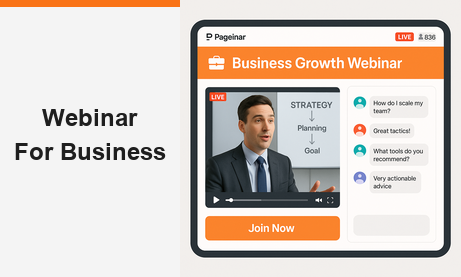
As the era of digital is continuously growing, webinars have become indispensable tools for businesses seeking to expand their reach, engage their audience, and drive growth. As a small business owner, online tutor, or coach/trainer, harnessing the power of a webinar for business can elevate your brand, attract new clients, and establish you as an authority in your field.
The rise of webinars is driven by their cost-effectiveness and ability to connect with global audiences in real time. Unlike traditional seminars, webinars eliminate the limitations of geography and physical presence, making them highly scalable. They allow for a two-way communication model that fosters engagement and builds trust. As more businesses adapt to remote-first operations and virtual client engagement, webinars have transitioned from being optional tools to essential components of a successful digital strategy. This guide aims to provide you with the proven tactics and best practices needed to host successful webinars that achieve your business objectives.
Moreover, this guide will take you through each step of the webinar hosting process, from preparation to post-event follow-up. We’ll start by discussing the importance of defining clear objectives and identifying your target audience. Next, we’ll explore crafting compelling content and promoting your webinar across multiple channels to maximize attendance. You’ll also learn about choosing the right webinar platform for your business, ensuring seamless technical setup, and delivering engaging presentations that captivate your audience.
After the webinar concludes, we’ll explore strategies for nurturing leads and gathering feedback to assess its effectiveness. Finally, we’ll discuss how to measure success using key performance indicators (KPIs) and continuously improve your webinar strategy for future events.
Preparing for Your Webinar for Business
The first step to a successful webinar starts long before the presentation. Clear goal-setting is critical. Ask yourself: Are you aiming to build brand awareness, generate qualified leads, educate your audience, or launch a product?

1. Define Objectives
Before diving into webinar planning, it’s essential to define clear goals and objectives. Whether you aim to generate leads, launch a new product, or educate your customers, setting specific objectives will guide your webinar strategy and measure its success.
2. Identify Your Target Audience
Understanding your target audience is crucial for tailoring your webinar content effectively. By analyzing demographics, interests, and pain points, you can create content that resonates with your audience and delivers value.
How To Craft Compelling Content
1. Choosing Topics
Selecting the right topic is key to capturing your audience’s interest and providing valuable insights. Choose subjects that address common pain points, offer solutions, and align with your audience’s interests to maximize engagement.
2. Developing Engaging Presentations
Create visually appealing slides, structure your content for clarity and impact, and incorporate interactive elements to keep participants engaged throughout the webinar. Encourage audience interaction and address questions in real-time to enhance the overall experience.
Promoting Your Webinar for Business
1. Multi-Channel Promotion
Utilize various marketing channels, such as email, social media, and your website, to promote your webinar and reach a wider audience. Consistent and targeted promotion across multiple channels will also help maximize attendance. You’ll find that your reach is continuously growing as you steadily promote your webinar.
2. Building Anticipation
Create buzz and excitement around your webinar by running teaser campaigns, creating countdowns, and offering exclusive incentives for registrants. In addition, building anticipation will increase attendance and engagement on the day of the event.
What Platform Should You Use?
When looking for a webinar for business platform, consider using Pageinar, offering unique features tailored to business needs. Pageinar is a webinar platform that operates as a landing page.
Unlike traditional webinar platforms that require multiple tools and windows to manage the event, Pageinar consolidates everything into a single landing page. This all-in-one format simplifies user experience for both hosts and participants.
Learn how Pageinar differs from its competitors and familiarize yourself with its features for seamless webinar execution.

Your Personalized Webinar Space: Pageinar isn’t just a platform; it’s your personalized virtual event space. Customize landing pages to reflect your brand and captivate your audience. You can tailor webinars to your brand and audience for a unique experience.
High-Level Customization: Elevate presentations with advanced customization features and add branding elements and interactive features for a memorable experience. Furthermore, you can engage your audience with visually stunning slides, live polls, and seamless presentation flow.
A Hub for Interaction and Networking: Pageinar extends beyond traditional webinars to become a hub for interaction and networking. Foster connections through live chat, Q&A sessions, and post-webinar discussions. Different chat types enable easy communication and audience engagement. Attendees can also interact, ask questions, and share insights, creating a community-driven event.
Picture-in-Picture: Experience multitasking convenience with Pageinar’s picture-in-picture feature. Picture-in-picture is not new to technology, but it’s a big feature for Pageinar as our competitors don’t have this feature. With this, hosts and participants can navigate different content while staying engaged in the main presentation. It allows flexibility for attendees to multitask on their preferred devices without missing crucial information.
Now that you have a webinar for business platform, it’s time to go to the technical side.
A seamless technical setup is crucial for delivering a professional webinar. Test all equipment in advance, including your microphone, camera, and internet connection. Choose a quiet location with good lighting and minimal distractions. Ensure that your slides and any supporting materials are ready and that your team knows their roles-whether that’s moderating the chat, handling tech support, or facilitating audience engagement.
During the webinar, maintain a conversational tone. Speak clearly, and make eye contact with the camera to establish a connection with your audience. Use body language and facial expressions to convey enthusiasm and authority. Encourage real-time interaction through chat boxes, polls, and Q&A sessions. Responding to participants by name and addressing their questions fosters a sense of community and makes attendees feel valued.
Post-Webinar Follow-Up
Once your webinar concludes, the real work begins. Promptly follow up with both attendees and registrants who couldn’t make it.
First, follow up with attendees and non-attendees through personalized emails, additional resources, and exclusive offers to nurture leads and drive conversions. Building relationships post-webinar is critical for long-term success.
Second, it’s necessary to collect participant feedback through surveys or polls to assess webinar effectiveness and identify areas for improvement. Feedback will also help you refine future webinar strategies and enhance audience satisfaction.
How To Know if Your Business Webinar is Successful
Before entering the world of webinar for business, you should know your KPIs. With this, you can measure webinar success by tracking attendance rates, engagement levels, and conversion rates. Therefore, it’s important to identify what your KPIs are to evaluate performance and inform future webinar strategies.

After that, you should analyze webinar data, identify strengths and weaknesses, and iterate on content and delivery to optimize results over time. For instance, if your goal was lead generation, how many attendees moved through your sales funnel post-webinar? If brand awareness was the aim, did your social media following or website traffic increase? Continuous improvement is also essential for maximizing the impact of your webinars and achieving long-term success.
Why Pageinar Is Ideal for Webinars in a Page
As mentioned earlier, Pageinar stands out for its unique “webinar in a page” format. Traditional webinar platforms often require multiple plugins or tools for registration, live chat, presentations, and follow-ups. Pageinar eliminates this fragmentation. From registration to replay, everything happens on one page. This not only enhances the user experience but also simplifies backend management for hosts.
Its built-in live chat allows for real-time interaction without needing third-party integrations. You can customize the chat type to fit your audience’s preferences-whether it’s private, moderated, or public. The flexibility in design ensures your branding is consistent and professional. Moreover, Pageinar’s analytics dashboard helps track performance metrics in real-time, giving you actionable insights immediately after the event.
Conclusion
Hosting a successful webinar for business involves more than just going live with a camera and a slide deck. It requires clear goal-setting, in-depth audience research, engaging content, strategic promotion, technical preparation, and diligent follow-up. By implementing the best practices outlined in this guide, you position your business to leverage webinars as a powerful marketing and engagement tool.
Using a platform like Pageinar, which supports the “webinar in a page” concept, further streamlines the process and enhances the participant experience. Whether you’re looking to attract new clients, establish thought leadership, or drive conversions, webinars are an effective, scalable solution that delivers measurable results. Now is the perfect time to harness the power of webinars to take your business to the next level.
By following the proven tactics and best practices outlined in this guide, you’ll be well-equipped to host webinars that drive results and propel your business forward. Ready to create your business webinar?