
An interactive webinar chat platform changes the way hosts and audiences connect online. Instead of passive watching, attendees ask questions, share reactions, and engage in real-time conversations throughout your event. Therefore, choosing the right interactive webinar chat platform can make or break your online broadcasts. Pageinar delivers exactly this: a hosted broadcast landing page with a built-in group chat that requires zero installation for your attendees.
Why an Interactive Webinar Chat Platform Matters
Online audiences have short attention spans. In fact, research consistently shows that engagement drops sharply when viewers cannot participate in the experience. However, when live chat is part of the event, attendees stay longer and retain more information. Moreover, chat creates a community feeling that transforms a one-way broadcast into a two-way conversation. As a result, hosts who use an interactive webinar chat platform regularly report higher satisfaction scores and more repeat attendees over time.
Additionally, live chat provides immediate feedback. For example, if many attendees ask the same question, you know which topic needs more attention on stage. Furthermore, chat logs serve as valuable post-event data for improving future sessions. Together, these benefits make interactive chat a core event feature, not an optional add-on.
Key Features of a Strong Interactive Webinar Chat Platform
Not all chat solutions are equal. Therefore, understanding what separates a basic chat widget from a truly interactive webinar chat platform helps you make the right investment for your audience.
Real-Time Messaging
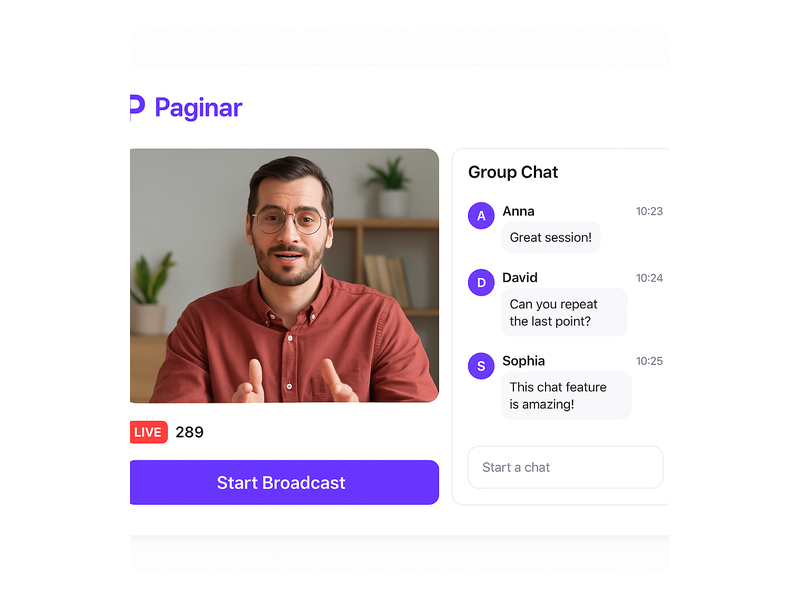
First, real-time messaging is the foundation of any strong chat experience. Messages must appear instantly, with no noticeable delay for attendees. Ideally, the platform supports hundreds of concurrent viewers without slowing down. Pageinar uses RumbleTalk group chat technology, which scales reliably for large events. Moreover, messages display with bold usernames and timestamps, making conversations easy to follow during a fast-paced broadcast.
Moderation Tools
Second, moderation tools are essential for professional events. Specifically, the host or a designated admin must be able to remove disruptive messages and manage participants in real time. In addition, Pageinar’s chat settings let you assign a chat admin that is separate from the broadcast host. Therefore, large events can have a dedicated moderator keeping the conversation focused and productive throughout the session.
Visual Chat Themes
Third, visual presentation affects how engaging the chat feels to your audience. For example, a dark theme with vibrant accent colors feels more modern than a plain white message box. Alternatively, a light professional theme suits corporate training sessions better. Pageinar offers multiple chat themes so you can change your chat theme to match your brand and event style perfectly. As a result, your interactive webinar chat platform feels cohesive with the rest of your page design.
Viewer and Speaker Display
Fourth, showing who is in the room builds community among your attendees. However, some hosts prefer privacy for their audience members. Therefore, Pageinar gives you a simple toggle to show or hide the viewers and speakers list inside the chat. Together, these controls let you customize the social experience based on your specific audience type and event goals.
How Pageinar Works as Your Interactive Webinar Chat Platform
Pageinar is designed to be the simplest interactive webinar chat platform available today. In fact, the entire setup takes minutes, not hours. Furthermore, attendees join without installing any software or browser plugin. They simply open a URL in their browser and they are immediately inside the event and connected to the chat.
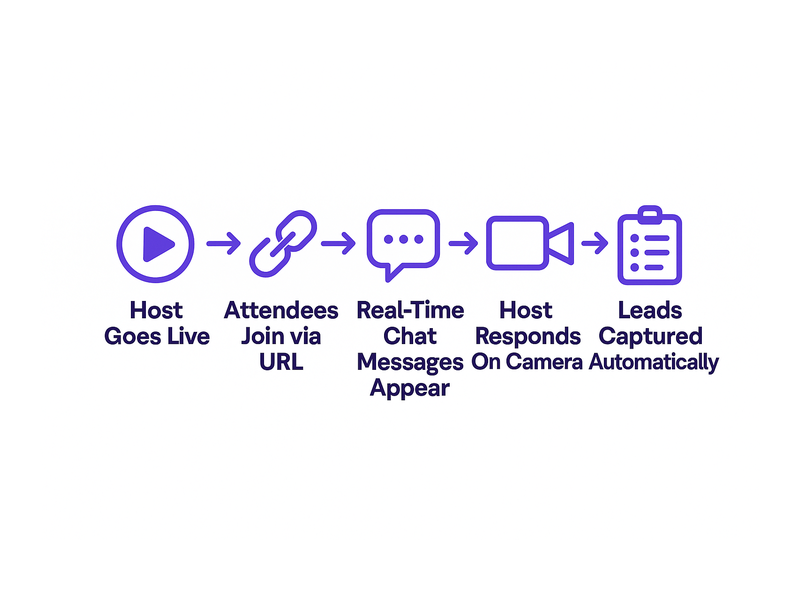
Here is how the platform works step by step. First, you log in to Pageinar’s webinar broadcast platform using your Google account. Second, your main broadcast page loads immediately after login. This page is your broadcast landing page and your interactive chat room combined into one. Third, you customize the cover image, avatar, event title, and description to match your brand. Fourth, you choose between Registration Mode and Broadcasting Mode depending on your current event phase. Finally, you share the page URL with your audience and go live with one click.
The Main Page Layout
The Pageinar main page features a clean two-panel bottom section. On the left, the RumbleTalk group chat panel handles all audience interaction during your broadcast. On the right, the live broadcast area displays your video feed, viewer count, and a start broadcast button. Additionally, a red LIVE badge appears automatically when you are on air. Moreover, an OFFLINE indicator shows clearly when the event has not yet started. In short, everything a viewer needs is visible on one page without any navigation required.
Chat Settings Explained
The settings panel gives you full control over your interactive webinar chat platform experience. Specifically, Chat Settings lets you configure the chat type, set an offline welcome message for early arrivals, assign a dedicated chat admin, choose from multiple visual themes, and toggle the viewer and speaker display on or off. Therefore, your setup is fully customizable without any technical knowledge or developer support needed.
Setting Up Your Interactive Webinar Chat Platform
Setting up Pageinar as your interactive webinar chat platform is straightforward. However, a few best practices will ensure the smoothest experience for your audience from the first minute onward.
- Choose your chat theme before the event. Match the theme to your brand colors so the chat feels like part of your event, not an afterthought dropped in at the last minute.
- Set an offline message. When attendees arrive before you go live, they see this message in the chat panel. Therefore, use it to welcome them and set clear expectations for the event start time.
- Assign a chat admin. For events with more than fifty attendees, having a dedicated moderator significantly improves conversation quality and keeps discussions on topic.
- Test the chat before the event. Send test messages from a second device, check the theme on both desktop and mobile, and confirm the admin controls work as expected.
- Enable the viewers display if community matters. Seeing other attendees in the room makes the event feel social and lively, rather than watching a recorded video alone at home.
Additionally, consider using Registration Mode before your event opens. In this mode, you collect attendee information through a fully customizable registration form. As a result, you know who is coming and can prepare tailored content for your specific audience. Moreover, all lead data is stored directly in Pageinar’s Registered List, which you can export at any time after the event.
Strategies for Engaging Your Audience on an Interactive Webinar Chat Platform
The best hosts treat the chat as a core part of the presentation, not a sidebar running alongside it. Therefore, here are proven strategies to maximize engagement on your interactive webinar chat platform every single event.
Ask Questions Early
First, ask attendees a direct question the moment you go live. For example, ask where they are joining from today or what their biggest challenge is in your topic area. This gets the chat moving immediately from the start. Moreover, early participation signals to late arrivals that the event is active, valuable, and worth staying for until the end.
Acknowledge Chat Messages on Camera
Second, read chat messages out loud during your presentation segments. For example, saying an attendee’s username and reading their question aloud makes every participant feel seen and valued. As a result, more people contribute to the chat because they know their messages will receive a direct response. Furthermore, this creates a conversational dynamic that keeps energy levels high throughout the entire session.
Use Chat for Live Polls
Third, chat works beautifully as a quick polling tool during your presentation. For example, ask attendees to type a number from one to five to rate their current knowledge level on your topic. Alternatively, ask them to type YES or NO in response to a simple scenario question. In fact, this tactic takes under thirty seconds and instantly raises the energy in any session. Ideally, run two or three quick chat polls throughout a sixty-minute broadcast.
Dedicate a Q and A Segment
Fourth, reserve the last ten to fifteen minutes for a dedicated Q and A session. Tell attendees at the very start of the event to save their questions for this segment. As a result, the chat fills up with quality questions toward the end. Moreover, a dedicated Q and A block gives your moderator time to curate the strongest questions and present them to the host in a logical, organized order.
Lead Generation Through Your Interactive Webinar Chat Platform
An interactive webinar chat platform is also a powerful lead generation engine. However, many hosts overlook this opportunity during their event planning process. In fact, every attendee who joins your broadcast is already a warm lead who opted in to hear from you. Therefore, Pageinar’s Registration Mode lets you capture their full contact details before they even enter the chat room.
The registration form collects First Name, Last Name, Company, Email, Phone, and any custom fields you define for your specific audience. Moreover, you control which fields are required and which remain optional for attendees to fill in. As a result, you can build a qualified lead list with every single event you run. Furthermore, the Registered List inside your Pageinar settings lets you search, filter, and export leads directly after each broadcast. In short, your interactive webinar chat platform doubles as a lead generation system with zero extra tools required.
Additionally, Pageinar supports password protection for private or exclusive events. For example, if you are running a paid webinar or a VIP client session, you can add a page password so only invited attendees can access the broadcast and chat. Therefore, your interactive webinar chat platform works equally well for large public events and small exclusive gatherings that require controlled access.
Best Practices for Running a Successful Interactive Webinar Chat Platform Event
Running a polished interactive webinar chat platform event requires solid preparation before the day arrives. Therefore, follow these proven best practices to ensure smooth execution from setup to post-event follow-up.
- Promote your event link early. Share your Pageinar URL on social media, email newsletters, and your website homepage. Because your page is always accessible at the same URL, early arrivals can explore it and register days before the event goes live.
- Customize the cover image. A branded cover sets the professional tone immediately. Ideally, include the event title, date, and your logo or avatar in the cover image for maximum impact.
- Add social links in Broadcast Settings. Link your Facebook, Instagram, Twitter, YouTube, or Twitch accounts so attendees can follow you on other platforms after the event ends.
- Record every broadcast. Pageinar stores all recordings in the Broadcast Recordings section of your settings panel. Therefore, you can share the replay with registrants who could not attend the live session.
- Export leads the same day. The Registered List export feature makes post-event follow-up fast and organized. As a result, your sales or marketing team can act on fresh leads while interest is still high.
For an in-depth look at what makes Pageinar different from other platforms, read Unlock the Power of Seamless Webinars with Pageinar: Welcome to a New Era of Online Engagement!. In fact, this article covers the core reasons Pageinar was built for simplicity and speed above everything else.
Why Pageinar Is the Right Interactive Webinar Chat Platform for Your Business
Pageinar stands out among interactive webinar chat platforms for three core reasons. First, it requires no installation for the host or the attendees at any point in the process. Second, everything lives on a single hosted page that is always ready and accessible via a permanent URL. Third, the integrated RumbleTalk chat delivers enterprise-grade features without any complex technical setup required from you.
Moreover, Pageinar is trusted by businesses at every scale. Notable partners include Nasdaq, Wix, HP, and Sony Music. Therefore, whether you are a solo creator running your first webinar or an enterprise team broadcasting to thousands of viewers, Pageinar’s interactive webinar chat platform grows with your needs over time. The Subscription Details panel shows your current plan, attendee limit, and remaining broadcast time so you always know exactly what your plan includes.
For further reading on the evolution of live broadcast technology, the Wikipedia article on webcasting provides helpful context on how real-time interaction became central to online events. In other words, interactive chat is not a trend. It is the new baseline expectation for professional online events in every industry.
Get Started with an Interactive Webinar Chat Platform Today
Starting your journey with Pageinar as your interactive webinar chat platform is simple and fast. First, visit pageinar.com and sign in with your Google account in seconds. Second, your broadcast page is ready immediately after login with no additional configuration needed. Third, customize it with your branding, choose your chat theme, and configure your registration form for lead collection. Finally, share the URL with your audience and go live. In short, your fully functional interactive webinar chat platform is live and ready for attendees within minutes, not days.
Ready to transform your online events into engaging, lead-generating conversations? Visit Pageinar today, set up your interactive webinar chat platform in minutes, and start building deeper connections with every audience you serve. Every broadcast is an opportunity to engage more, capture more leads, and grow your community faster than ever before.