

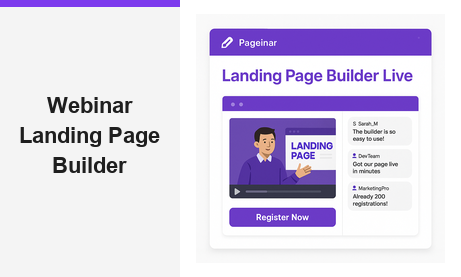
A webinar landing page builder is the most powerful tool you can use to grow your online audience and generate qualified leads before your broadcast even begins. For any host, marketer, or educator looking to run a professional live event, your landing page is the first impression your audience has of your brand. Therefore, getting it right matters enormously. In fact, a well-optimized event page can increase registration rates by over 50 percent compared to a plain email invite. With Pageinar, you get an all-in-one webinar landing page builder that is hosted, branded, and ready to share in minutes, with no plugins or code required on either side of the screen.
\n\n\n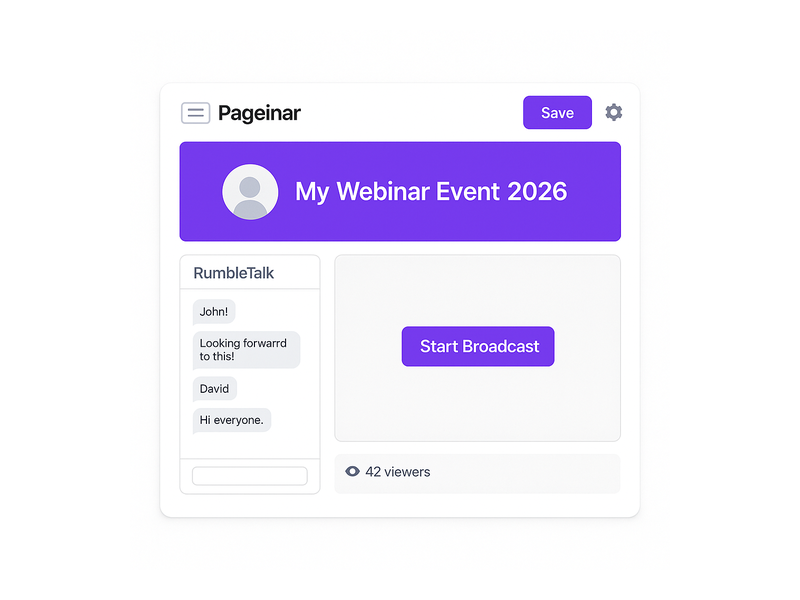
What Is a Webinar Landing Page Builder?
\n\n\n\nA webinar landing page builder is a dedicated tool for creating a professional web page for your live event. This page typically includes a registration form, event details, a description of what attendees will learn, and a clear call to action. Moreover, advanced platforms like Pageinar go further by combining the registration experience with the actual live broadcast environment. This means your attendees register, attend, and engage with your content all on a single hosted page. In other words, there is no need to juggle multiple platforms or ask your audience to install anything at all.
\n\n\n\nFor example, a marketing team running a product launch webinar can use a webinar landing page builder to collect attendee names, company details, and email addresses before the event begins. Additionally, they can customize the page to match their brand colors, add a countdown timer, and write a compelling welcome message to boost registrations. As a result, their event feels polished and professional from the very first click, setting expectations that the broadcast itself will deliver real value.
\n\n\n\nFurthermore, the best webinar landing page builders include built-in lead export tools and live chat capabilities. Together, these features transform a simple sign-up form into a complete event management hub that serves your audience from discovery all the way through post-event follow-up and replay access.
\n\n\n\nKey Features Every Webinar Landing Page Builder Should Have
\n\n\n\nWhen choosing a webinar landing page builder, you should look for a specific set of features that make the difference between a basic sign-up form and a high-converting event page. Here are the most important capabilities to evaluate before committing to any platform.
\n\n\n\nCustom Branding and Design
\n\n\n\nFirst, your webinar landing page builder should let you fully customize the visual identity of your page. This includes uploading a cover image or background, adding your avatar or company logo, and writing a compelling event title and description. Ideally, you should also be able to choose a color scheme that aligns with your brand without touching a single line of code. With Pageinar, you can edit every visual element of your broadcast page directly from the main dashboard. As a result, your event page looks professional and on-brand every time you share it with a new audience.
\n\n\n\nRegistration and Lead Collection
\n\n\n\nSecond, a powerful webinar landing page builder must include flexible registration and lead collection tools. You should be able to toggle fields like First Name, Last Name, Company, and custom fields on or off depending on your event requirements. Moreover, all leads collected through the registration form should be stored in a searchable list you can export at any time. For instance, Pageinar\’s Registration Settings panel lets you configure exactly which fields to show, set a welcome message, upload a background image or video, and display a countdown timer to build anticipation before your event goes live.
\n\n\n\nLive Broadcasting Controls
\n\n\n\nThird, your event page platform should integrate broadcasting controls directly into the page. With Pageinar, your audience never leaves the landing page to watch the live stream. Instead, the broadcast plays inline alongside a live group chat panel powered by RumbleTalk. Furthermore, the host can toggle between Registration Mode and Broadcasting Mode with a single click, making event management completely straightforward. To learn more about how these two modes work together, visit the Pageinar Knowledge Base for a full step-by-step walkthrough of each mode.
\n\n\n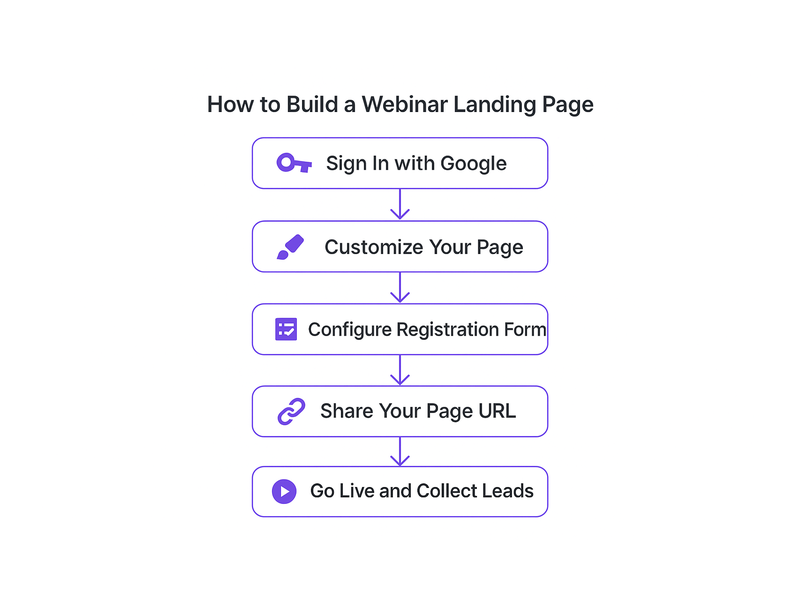
How Pageinar Works as Your Webinar Landing Page Builder
\n\n\n\nPageinar is built from the ground up to serve as a complete webinar landing page builder for professionals, marketers, and educators. Here is how the platform works from first login to your first live broadcast, step by step.
\n\n\n\nFirst, you sign in to Pageinar using your Google account. There is no complicated onboarding, no credit card required for the free plan, and no software to install. Second, after login, you land directly on your broadcast page, which is your main event page. Third, you customize the page header by uploading a cover image, adding your avatar, writing your event title, and filling in the description text. Fourth, you open the Settings panel to configure your registration fields, set a date and time, and write a welcome message that greets visitors when they arrive on your page.
\n\n\n\nAdditionally, you can add social links to your broadcast page so that attendees can follow you on Facebook, Instagram, Twitter, YouTube, or Twitch. In short, Pageinar gives you a complete webinar landing page builder experience inside a single, clean dashboard. Moreover, once your page is ready, you simply share the URL with your audience. Attendees click the link, fill out the registration form, and receive confirmation automatically. As a result, your lead list grows in real time as each new registration arrives.
\n\n\n\nStep-by-Step: Building Your First Webinar Landing Page
\n\n\n\nBuilding an event page with this platform takes only a few minutes. However, taking the time to set each section up carefully will have a measurable impact on your conversion rate and lead quality. Below is a practical guide to each major configuration step.
\n\n\n\nSetting Up Registration Mode
\n\n\n\nWhen you first set up your page in Pageinar, the default view is Registration Mode. This is where visitors land before your broadcast begins. Therefore, it is the most critical part of your webinar landing page builder setup. To configure it, open Settings and select Registration Settings. Here you choose a template, set your event date and time, and toggle which lead fields to collect. Furthermore, you can upload a header image or video to make the registration experience visually compelling. Ideally, your page should answer three key questions for every visitor: what will they learn, why should they attend, and what makes this event worth their time.
\n\n\n\nGoing Live with Broadcasting Mode
\n\n\n\nWhen it is time to go live, you toggle your Pageinar page from Registration Mode to Broadcasting Mode. This transition is seamless for your audience. The page updates automatically, and the broadcast area becomes active. Your viewers can watch the live stream, interact in the RumbleTalk group chat, and engage with the event without any downloads or plugins. For example, a training company running a monthly webinar series can use Pageinar as their ongoing broadcast platform. Each month, they update the title, upload a new cover image, configure the registration fields, and share the URL with a new audience segment.
\n\n\n\nIn addition, Pageinar stores recordings of every broadcast automatically. Therefore, even if an attendee misses the live session, they can watch the recording afterward. Over time, you build a growing lead list and a loyal community of attendees who trust your events and return for future broadcasts, compounding your reach with every session.
\n\n\n\nUse Cases: Who Benefits Most from a Webinar Landing Page Builder?
\n\n\n\nVirtually any professional who communicates with an audience online can benefit from a webinar landing page builder. However, some use cases stand out as particularly strong fits for the Pageinar platform and its all-in-one approach to live event delivery.
\n\n\n\nMarketing teams use webinar landing pages to generate leads during product launches, thought leadership events, and customer education sessions. With Pageinar, they collect detailed lead data, export the attendee list after the event, and feed it directly into their CRM or email marketing tool. As a result, every broadcast becomes a measurable lead generation activity with a clear ROI.
\n\n\n\nEducators and trainers rely on the platform to run live classes, workshops, and Q&A sessions. The integrated RumbleTalk chat allows students to ask questions in real time, while the recording feature ensures that those who miss the live session can still access the content at their own pace.
\n\n\n\nEvent organizers benefit from the registration and lead collection capabilities built into every Pageinar page. They set a date and time, configure a countdown timer, and collect attendee information before the event begins. In addition, they use the social links feature to promote the broadcast across multiple channels from a single settings panel, without managing several separate tools.
\n\n\n\nContent creators and influencers use Pageinar for live Q&As, product reveals, and community broadcasts. The clean, branded page format gives their events a professional look that reinforces their personal brand without requiring any design or development skills whatsoever.
\n\n\n
Why Choose Pageinar as Your Webinar Landing Page Builder?
\n\n\n\nThere are many reasons why professionals choose Pageinar as their preferred webinar landing page builder. Here are the most compelling advantages that set this platform apart from generic alternatives in the market.
\n\n\n\n- \n
- No installation required. Your attendees need only a browser and a URL. There is no app to download and no plugin to install on either side of the connection. \n
- All-in-one platform. Your registration page, live broadcast, and group chat are all on a single hosted page, reducing friction at every step of the attendee journey. \n
- Instant setup. Your event page is ready in minutes, not hours, so you can focus on your content rather than on configuring your tech stack. \n
- Lead collection built in. Automatically collect and export attendee data from every event, including name, company, email, and phone number, all from a single dashboard. \n
- Trusted by leading brands. Pageinar is used by teams at recognized organizations including Nasdaq, Wix, HP, and Sony Music. \n
Furthermore, Pageinar offers subscription plans that scale with your audience size. Whether you are hosting a small internal training or a large public broadcast, you can upgrade when your needs grow. Additionally, Pageinar integrates RumbleTalk\’s powerful group chat directly into every broadcast page, so your audience can ask questions and engage in real time without switching tabs or using a separate application.
\n\n\n\nIn short, Pageinar is not just a webinar landing page builder. It is a complete broadcast event platform that handles registration, live video, and audience engagement all in one place. According to industry data published by Statista, the online events market continues to grow year over year, making a reliable and professional live event platform more important than ever for businesses of all sizes.
\n\n\n\nGetting Started: Launch Your Event Page in Minutes
\n\n\n\nGetting started with a webinar landing page builder does not have to be complicated. With Pageinar, you can have a fully branded registration page live and ready to share in under ten minutes. Here is the quick-start process:
\n\n\n\n- \n
- Visit pageinar.com and sign in with your Google account. No password required, no credit card needed for the free plan. \n
- Customize your broadcast page header with your event title, cover image, and avatar. \n
- Open Settings and configure your registration form fields, event date, and welcome message. \n
- Toggle to Registration Mode and copy your unique page URL. \n
- Share the URL with your audience via email, social media, or any other channel you prefer. \n
- When it is time to go live, toggle to Broadcasting Mode and click Start Broadcast. \n
Therefore, within minutes of signing up, you have a fully functional event page collecting leads, displaying your event details, and delivering a live broadcast to your audience with no code and no plugins required anywhere in the process.
\n\n\n\nConclusion: The Right Webinar Landing Page Builder Makes the Difference
\n\n\n\nA high-quality webinar landing page builder is no longer a nice-to-have tool. It is an essential part of any professional online event strategy. Moreover, the right platform removes every technical barrier between you and your viewers, letting you focus entirely on your content and your community. Pageinar delivers all of this in one clean, hosted solution that is trusted by some of the most recognizable brands in the world.
\n\n\n\nReady to build your first event page? Get started for free and see the platform in action. For more inspiration on what is possible, read our post Unlock the Power of Seamless Webinars with Pageinar: Welcome to a New Era of Online Engagement! to see how Pageinar is changing the way professionals run live events and grow their audiences online.
\n