

How to Delete Your Webinar Page in Pageinar
Deleting your webinar page in Pageinar permanently removes your broadcast page and all associated data — this action is irreversible, so export any recordings or registration data you need before proceeding.
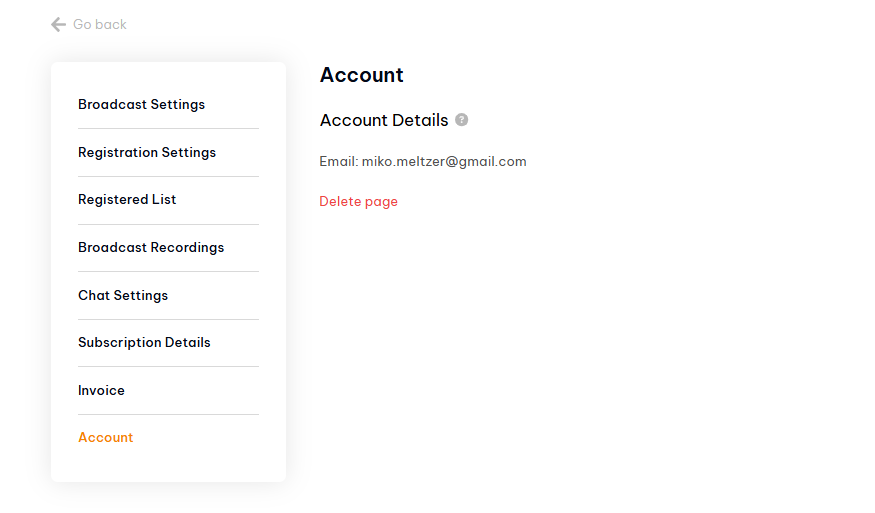
How to Delete Your Webinar Page: Step-by-Step
- First, export your data — go to Broadcast Recordings and export any recordings you want to keep.
- Go to Registered List and export your attendee data.
- Log in to pageinar.com if not already.
- Click the gear icon → Account.
- Click Delete page.
- Confirm the deletion. Your page and all data are permanently removed.
What Is Deleted When You Delete Your Pageinar Page
- Your broadcast page and its unique URL.
- All broadcast recordings.
- Your entire registered users list.
- All settings including chat configuration, social links, and registration settings.
Tip: There is no recovery option after deleting your page. If you just want a fresh start, consider updating your title and settings instead of deleting.
Go to Settings → Account and click Delete page. Confirm to permanently remove your page and all associated data.
No. Deleting your page is permanent and cannot be undone. Export all data you need before deleting.
Deleting your page does not automatically cancel your subscription. Cancel your subscription first in Subscription Details if you no longer need it.
Yes. Sign in with your Google account at pageinar.com to create a new broadcast page.
Deleting your page removes the broadcast page and its data. Your Google account association with Pageinar remains — you can create a new page by signing in again.